On this page · 16 sections
- What a smart home app actually does
- The architecture: app, backend, hub and devices
- Do you need a backend server?
- How devices connect: Wi-Fi, Bluetooth, Zigbee, Thread, Matter and MQTT
- Controlling devices from different brands
- What the backend should contain
- An example architecture for a real product
- iOS architecture: Swift, SwiftUI, HomeKit and Matter
- iOS update compatibility and regression testing
- What happens when the internet goes down?
- Security: why a smart lock needs more than a login screen
- How much does it cost to build?
- Build from scratch or use an existing platform?
- Common mistakes to avoid
- How eCorpIT can help
- References
Summary. A smart home app is the visible part of a system that discovers devices, authenticates people, routes commands over the right network, confirms what the device actually did and fails safely. Whether you need your own backend depends on scope: a local-only app for a few compatible devices can run without one, while remote access, shared households, notifications and history usually need cloud services, and most dependable products combine local control with the cloud. Matter, now at version 1.6 (June 2026), is a local standard that runs over Wi-Fi, Ethernet and Thread, covers locks, thermostats, room air conditioners, lights, sensors and, since version 1.5, cameras, but defines no cloud API and does not make older devices compatible. On iOS, plan for the HomeKit entitlement, Apple's MatterSupport framework, local network permission prompts and App Store rules that require the iOS 26 SDK now and an iOS 15 minimum from April 2027. Treat door locks as security-critical, check permissions on the server for every command, and design for what happens when the internet goes down. Selling devices also brings rules: the UK's PSTI regime applies now, and the EU Cyber Resilience Act's main duties start in December 2027.
About this article. This guide covers the app and backend side of a smart home product; firmware and hardware design are out of scope. Standards versions, platform requirements and regulations were checked against the Connectivity Standards Alliance, Apple, Google, AWS, Home Assistant, UK and EU sources on 29 October 2026. Requirements change, so confirm current terms before you commit. Researched with AI assistance and reviewed by our editorial team.
What a smart home app actually does
A smart home app connects an interface to physical devices and their capabilities:
- Door lock: lock and unlock, battery status, access history, temporary guest access where supported.
- Air conditioner or thermostat: power, setpoint, mode, fan speed, current temperature.
- Lights and switches: on and off, brightness, colour, schedules.
- Sensors: door and window state, motion, temperature, humidity, leaks.
- Cameras and doorbells: live view, events, notifications and recording, usually with extra vendor requirements.
Devices do not share one control method. A Wi-Fi air conditioner may expose a vendor cloud API, a lock may use Bluetooth or Thread through a hub, and a low-power sensor may use Zigbee. So the product needs a device integration layer: one internal model for devices, with an adapter for each protocol, vendor API or ecosystem you support.
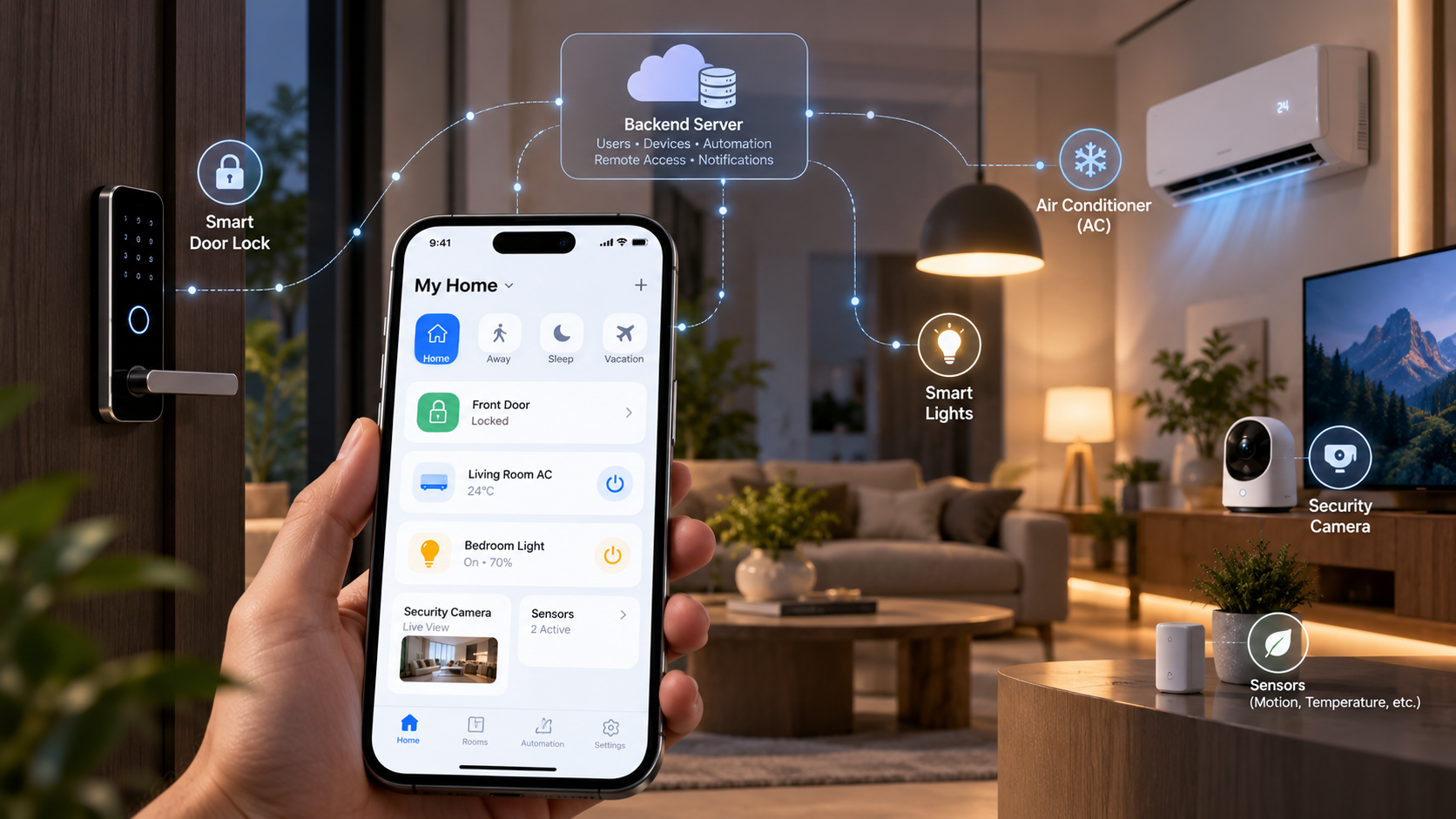
The architecture: app, backend, hub and devices
A typical commercial product has these logical parts:
- Mobile app: sign-in, home dashboard, device setup, controls, permissions, scenes and alerts.
- Identity and API backend: verifies users, checks household membership and permissions, exposes authenticated APIs.
- Device registry and state store: homes, rooms, devices, capabilities, last-known state, online status.
- Command service or message broker: routes commands to the right device or gateway and tracks acknowledgements.
- Local hub or controller (optional, often valuable): talks to local devices and runs automations without the internet.
- Device firmware and connectivity: the software and radio stack inside each device or bridge.
- Cloud services, feature by feature: remote access, push notifications, history, integrations and over-the-air updates.
These are responsibilities, not seven servers. A prototype can run one backend service and a database; a larger product splits command routing, notifications, provisioning and analytics as scale demands.
What happens when a user turns on the AC from the app
- The app sends an authenticated request, or uses a local path if the device is reachable on the home network.
- The system checks that this user may control this device.
- An integration translates the generic request into the device's own command.
- The command travels over the local network, through a hub or through the vendor's cloud.
- The device acts and reports its new state, where it supports reporting.
- The app shows the confirmed state, not just the fact that a button was tapped.
That last step matters. A successful HTTP response often means the command was accepted, not that the device finished. A good interface distinguishes requested, in progress, confirmed, failed and unknown. AWS IoT's device shadows model this directly, keeping a desired state and a reported state, and making the last known state available whether or not the device is connected.
Do you need a backend server?
There are three common approaches.
Option A: direct local control, no custom cloud
The app talks to devices on the home network, or to a local controller. This suits prototypes, single-vendor local products and apps that do not need remote access or cloud accounts. It costs less to run, can respond faster, keeps more data at home, and basic controls survive an internet outage as long as the router, controller and devices stay up.
The limits: remote access is harder, the phone may need to be on the same network, sharing and permissions still need careful design, each vendor and protocol adds integration work, and automations that live only on a phone stop when the phone is away. No cloud backend does not mean no server: a local hub may run a controller, database, automation engine and integrations inside the home. Home Assistant is a working example: it runs on the user's own hardware and keeps working when the internet is down, with remote access off by default and offered through its paid cloud service, a VPN, a reverse proxy or port forwarding.
Option B: cloud-first
The app talks to your backend, which reaches devices through vendor clouds, internet-connected devices or a gateway. You get remote access, central accounts, sharing, audit logs, multiple homes and a place to manage firmware and device health. You also inherit cloud outages, hosting and support costs, extra latency, and vendor API quotas and terms. Cloud dependence should be a deliberate product choice, not an accident of the first build.
Option C: hybrid local and cloud
For most commercial products this is the default worth evaluating: local paths for supported in-home control and automations, cloud services for remote access, accounts, notifications, history and integrations. The two paths need a clear policy, for example so a command is not executed twice when a local call succeeds and a delayed cloud call arrives, and so state is reconciled after an outage.
For security-sensitive devices such as locks, design local, remote and outage behaviour deliberately. Do not make every basic lock action depend on a cloud round trip without a specific reason and a safe fallback.
How devices connect: Wi-Fi, Bluetooth, Zigbee, Thread, Matter and MQTT
These terms are not interchangeable: some are network transports, Matter is an application standard, and MQTT is a messaging protocol.
| Technology | What it is good for | Main caveat |
|---|---|---|
| Wi-Fi | Air conditioners, cameras, plugs and mains-powered devices | Many devices use proprietary cloud APIs; Wi-Fi alone does not mean interoperability |
| Bluetooth Low Energy | Nearby setup, commissioning and some direct control | Short range; remote access needs another path or hub |
| Zigbee | Low-power mesh sensors, switches and bulbs | Needs a coordinator or hub, and a Zigbee network has only one coordinator |
| Thread | Low-power IPv6 mesh for smart home devices | Needs a Thread border router to reach other networks |
| Matter | A local, application-level interoperability standard over Wi-Fi, Ethernet or Thread | Defines no cloud API and does not make existing devices compatible |
| MQTT | Lightweight publish and subscribe messaging between devices, gateways and cloud | A messaging protocol, not a discovery or compatibility standard |
Thread's border router requirement is spelled out in OpenThread's documentation. MQTT 5 is an OASIS standard.
Why Matter matters, and what it does not do
The Connectivity Standards Alliance describes Matter as a local connectivity technology that uses Bluetooth Low Energy for setup and Wi-Fi, Thread or Ethernet for device communication; bridges let Zigbee or Z-Wave devices take part, though there is no native interoperability between Matter and Zigbee devices. Matter 1.0 covered locks, HVAC, lighting and sensors; standalone room air conditioners arrived in 1.2 in 2023, cameras in 1.5 in November 2025, and Matter 1.6 in June 2026 added NFC-based commissioning as an alternative to Bluetooth setup rather than new device categories.
Matter does not mean any app can control every lock or air conditioner on the market. Older devices need a vendor integration or a bridge, and remote access, firmware delivery and manufacturer-specific features may still rely on cloud services. As AWS's Matter guidance puts it, Matter as currently defined supports local access only, with remote control available when a Matter hub supports it.
Certifying your own Matter device is a business decision too. Certification is open only to Alliance members, needs testing at an authorised test provider, and from April 2026 costs at least $7,500 a year for Adopter membership plus a $3,000 fee per product, before lab fees. Decide early whether you will support Matter-certified accessories, integrate selected vendors directly, use a bridge, or build your own hardware.
Controlling devices from different brands
Keep vendor logic out of your screens. Define a common device model and map each integration to it. An air conditioner might expose power, target_temperature, operating_mode, fan_speed and current_temperature; each vendor adapter translates a generic set-temperature request into its own API or local protocol and exposes only the capabilities and limits that device really has.
Locks are different. Unlocking is not like switching on a light: it can need stronger verification, explicit confirmation, rate limits, event logs and strict permissions. Platforms do this too: Apple, for example, will not let Siri unlock a door while the iPhone is locked.
A useful device record holds a unique ID, home and room, vendor, model and integration type, supported capabilities, reported state and when it was reported, connectivity status, firmware version where available, and ownership and permission metadata. Never treat last-known state as truth: a disconnected lock may have changed since its last report.
On the platform side, Google's Home APIs let Android and iOS apps control devices in a user's Google Home, commission Matter devices and build automations, though Google's developer console is not yet open for registration. If you run your own cloud and want Google Home users to reach your devices, cloud-to-cloud integration supports more than 80 device types; Google is moving account linking into the Google Home app, and its banner warns integrations may need updates before 30 October 2026. For local control, Google now points new devices at Matter rather than its older Local Home SDK.
What the backend should contain
For a product with accounts and remote control:
- Identity and households: sign-in and sessions; homes, rooms, members and invitations; roles such as owner, admin, resident and guest; revoking a lost phone or a former member.
- Onboarding and registry: secure device claiming and ownership, commissioning status, vendor tokens and device credentials in proper secret storage, capability discovery, connection health and firmware metadata.
- Commands and state: request validation and permission checks, routing to a gateway, integration or vendor cloud, command IDs for idempotency, acknowledgements and timeouts, and isolation between households.
- Automations: schedules, sensor triggers and scenes; conditions, time zones, retries, cooldowns and conflict handling; local execution for automations that must survive an outage.
- Notifications and history: user-chosen push alerts, audit history for sensitive actions, state history where it helps, retention and deletion controls.
- Operations: monitoring, logs and alerts, over-the-air updates where you control firmware, rate limits, backups, key rotation and recovery procedures.
A first release does not need these as separate microservices. Start with clear boundaries in one maintainable application and split only when scale or team ownership justifies it.
An example architecture for a real product
- Mobile: Flutter or native Android and iOS.
- Backend API: a framework your team can operate, such as NestJS, Spring Boot or FastAPI.
- Database: Postgres for users, homes, devices, permissions and audit metadata; our Firebase vs Supabase comparison covers two managed options.
- Messaging: an MQTT broker or managed IoT messaging where devices need publish and subscribe.
- Local controller: an existing compatible hub or a purpose-built gateway for local protocols and offline automations.
- Cloud: managed hosting, secrets management, monitoring, backups and push notifications.
- Integrations: Matter where supported, plus tightly scoped vendor APIs or bridges.
This is an example, not a required stack. A single-vendor cloud product may not need MQTT, a Matter-focused product may rely on an existing controller, and a local-only enthusiast system may need no custom cloud at all.
            Mobile app (iOS / Android / Flutter)
        |  HTTPS, or a secure local path
        v
Identity + API  (homes, members, permissions)
        |
        +-->  Device and command API  -->  Integration layer (Matter / vendor APIs / MQTT)
        |                                        |                 |
        |                                  Local hub /       Vendor cloud API
        |                                  gateway           (where required)
        |                                        |                 |
        |                                  Local devices     Internet-connected
        |                                  (Thread, Zigbee,  devices or gateways
        |                                  Wi-Fi, Matter)
        |
        +-->  Events, history and notifications
Not every command passes through every box: a supported local command can stay inside the home, and a remote command may go through the cloud to a connected gateway or vendor service.
iOS architecture: Swift, SwiftUI, HomeKit and Matter
An iOS app needs the same core layers as an Android app, plus Apple's frameworks, privacy permissions, background rules and App Store requirements.
- Presentation: SwiftUI or UIKit screens for homes, rooms, devices, automations and alerts.
- Domain: device capabilities, scenes, command state and permission rules, independent of the UI framework.
- Integration: HomeKit, Matter frameworks, vendor SDKs, Bluetooth setup and local-network communication as your devices require.
- Networking: authenticated API calls, retries, timeouts and connectivity changes.
- Persistence: a small cache of last-known state, never treated as confirmed live state.
- Security: Keychain storage for tokens, short-lived credentials, and server-side authorisation for remote commands.
Flutter can share code across iOS and Android, but integrations still need native code, plugins, entitlements and platform testing; a cross-platform framework does not remove iOS responsibilities. Our iOS developers and Flutter team work on both routes.
HomeKit or Matter?
Apple's HomeKit framework lets your app discover HomeKit-compatible accessories, add them to the user's home configuration and control them. Enabling the HomeKit capability adds the HomeKit entitlement, and you must supply an NSHomeKitUsageDescription purpose string, or the app crashes the first time it touches HomeKit. For Matter, the MatterSupport framework (iOS 16.1 and later) lets your app add Matter devices to its own ecosystem through the system setup flow, and you then commission and control them with Apple's Matter framework. Apple Home itself has supported Matter since iOS 16.1, and HomeKit's own security uses Ed25519 key pairs, an SRP-based pairing protocol and end-to-end encrypted commands through home hubs.
Adding HomeKit does not mean you control every lock or air conditioner on the market: accessory certification, supported characteristics and vendor features still matter. Confirm the accessory category, operating system requirements, commissioning flow, and whether you control only your own devices or third-party ones too.
Local network permission is part of the design
If the app talks to devices or discovers services on the home network, iOS shows a local network privacy alert the first time it does so (iOS 14 and later). Apple asks every app that uses the local network to provide an NSLocalNetworkUsageDescription, and Bonjour discovery needs the service types listed in NSBonjourServices. Explain why you need access before the system prompt appears, give a recovery path if the user declines, and test first run, denial, changes in Settings, Wi-Fi switches and reconnection. A cloud-only integration may not need the permission at all, so request it only for the networking you actually do.
iOS update compatibility and regression testing
Opening on a new iOS version is not the same as being compatible. OS updates can change permission flows, networking, Bluetooth, background execution, notifications and third-party SDKs, while device firmware and vendor APIs change on their own schedules.
Write down a support policy: the minimum iOS version, the versions and physical devices you test, the Xcode and SDK used for release, features tied to specific OS versions, and how long older app and device versions stay supported. Re-check Apple's rules each release. Since 28 April 2026, uploads must be built with Xcode 26 or later and an iOS 26 SDK; since 9 September 2026 they must target iOS 13 or later; and from April 2027 Apple will require the iOS 27 SDK and an iOS 15 minimum. Xcode 26 itself only targets iOS 15 and later, so in practice plan for iOS 15 now.
| Area | What to test after an iOS or app update |
|---|---|
| Sign-in and sessions | Sign-in, token refresh, logout, recovery and expired sessions |
| Local network access | First-run prompt, denial, change in Settings, LAN discovery |
| Bluetooth setup | Pairing, interrupted setup, Bluetooth off and on, reconnect |
| Device controls | AC setpoint and mode, light state, lock command, timeouts, acknowledgements |
| State accuracy | Foreground and background transitions, stale state, offline devices, delayed reports |
| Notifications | Permission granted or denied, delivery, deep links, duplicates |
| Background behaviour | Supported background tasks and reconnection only |
| Automations | Time-zone and daylight-saving changes, offline runs, duplicate triggers |
| Security | Keychain and sessions, household permissions, revocation, lock authorisation |
| Compatibility | Minimum OS, latest iOS, device families, accessibility and layout |
Test on simulators for UI and repeatable automation, and on real iPhones for Bluetooth, commissioning, real networks, biometrics and end-to-end runs with actual locks, hubs and sensors. Keep three kinds of compatibility apart: the app on supported iOS versions, the devices and vendor integrations, and backend API compatibility with app versions still in use. Versioned APIs, staged rollouts, privacy-respecting telemetry and a rollback plan help you tell them apart when something breaks. If push notifications are involved, our guide to iOS push notification environments covers a common failure.
What happens when the internet goes down?
| Feature | Local-first design | Cloud-dependent design |
|---|---|---|
| Control a device on the home network | Works if the local network and controller work | Fails if commands go through the cloud |
| Control from outside the home | Needs a secure remote path | Works while cloud and home internet are up |
| Local schedules and sensor automations | Continue if they run locally | Stop if the automation engine is cloud-only |
| Push notifications | Need internet services | Need internet services |
| Cloud-synced history | Limited until sync resumes | Depends on cloud availability |
| Devices that need a vendor cloud | Depend on a local integration existing | Fail if the vendor service is down |
Local is not automatically resilient: routers, hubs, power and devices still fail, and a hybrid system must define what happens when the local path is down and the cloud is slow. Be honest in the interface: if the app cannot confirm a lock's state, say the status is unavailable rather than showing locked because that was the last report.
Security: why a smart lock needs more than a login screen
A smart home system affects physical access, privacy and safety, so threat-model it accordingly:
- Strong authentication, with established identity standards and multi-factor options.
- Server-side authorisation of household membership and device permissions for every sensitive operation; a hidden button is not access control.
- Secure onboarding, so nobody can claim a device from its serial number or by being on the same Wi-Fi.
- Encrypted, authenticated channels between app, server and devices.
- No long-lived shared secrets in the app or firmware; vendor tokens and device credentials in proper secret storage.
- Authenticated firmware updates, protected signing keys and a plan for end-of-life devices.
- Audit and alerts for sensitive actions, with a way for users to review and revoke household access.
- Rate limits on login, pairing, invitations, recovery and lock control.
- Defined failure behaviour for power loss, network loss, failed commands and compromised accounts.
- Privacy by design: collect only what you need, limit retention and give household members clear controls.
Never rely on an obscure endpoint, a hidden button or a device's network location as the only boundary, and remember that cloud encryption does not fix weak onboarding or missing authorisation. Our guide to mobile application security covers the app side in depth, and how mobile app reverse engineering works explains why secrets in the app are never safe.
Regulations if you sell connected devices
| Market | Rule | Status in October 2026 |
|---|---|---|
| UK | PSTI product security regime | In force since 29 April 2024: unique or user-set passwords, a way to report security issues, published minimum security update period |
| EU | Radio Equipment Directive cybersecurity rules (Regulation 2022/30) | Applied from August 2025; repealed with effect from 11 December 2027, when the CRA takes over |
| EU | Cyber Resilience Act | Vulnerability and incident reporting from 11 September 2026; main obligations from 11 December 2027 |
| US | Cyber Trust Mark | Launched January 2025, but no labelled products yet; testing rules still being finalised |
| Global baseline | ETSI EN 303 645 | Version 3.1.3 (September 2024) is the consumer IoT security baseline |
The UK government's PSTI guidance, the European Commission's RED page and the FCC's administrator order carry the details. If you only build the app for someone else's devices, these duties fall mainly on the device maker, but your onboarding, update and vulnerability-reporting flows usually have to support them. Our Cyber Resilience Act reporting explainer covers the September 2026 duties.
How much does it cost to build?
There is no universal price. A UI prototype with simulated devices costs a fraction of a production system that controls real locks and air conditioners. The cost drivers are the number and variety of integrations, whether manufacturers provide stable APIs and test devices, Matter certification, hub or gateway development, remote access and automation, security testing and compliance, expected homes and command volume, and ongoing monitoring, support and cloud bills. Separate one-time engineering and testing from recurring cloud, licensing, certification, maintenance and support costs. Our guide to app development cost in India shows how these line items appear in a quote.
A sensible phased plan:
- Validate the use case. Pick one or two device categories, confirm how they really connect and integrate, and prototype the UI with simulated state.
- Prove it on real devices. Integrate a few supported devices; test setup, acknowledgements, state reconciliation and network loss; decide what must work locally.
- Add production backend features. Accounts, homes, ownership and permissions; secure remote access, monitoring, notifications and recovery; security and reliability testing before you release lock control.
- Expand the ecosystem. Add adapters or Matter support on demand, test mixed-vendor homes and firmware differences, and measure failure rates, latency, support load and cloud cost before scaling.
Build from scratch or use an existing platform?
Use an existing platform to validate a dashboard, local automations or integrations quickly. Home Assistant shows a system can run locally with optional remote access, and its code is Apache-2.0 licensed, which permits commercial use, though its name and logo are trademarks. Check supported devices, deployment constraints and suitability for a commercial product.
Build your own backend when you need your own accounts and brand, fleet management, a commercial access model, device provisioning, support workflows or custom integrations; you then own uptime, security, upgrades, data and support.
Build custom hardware or firmware only when existing devices cannot meet your requirements or hardware is the product. That is a much larger effort than an app and backend.
Common mistakes to avoid
- Assuming every device uses Wi-Fi or exposes a public API.
- Assuming Matter makes every device and feature interoperable.
- Sending every command through the cloud without considering local control.
- Building the UI before checking that target devices can be integrated.
- Showing a requested state as if the device confirmed it.
- Treating a smart lock like an ordinary on and off switch.
- Putting vendor credentials or permanent secrets in the app.
- Skipping device removal, ownership transfer and member revocation.
- Estimating cost from screen count while ignoring compatibility, testing and support.
- Launching without an update and end-of-life plan for devices.
How eCorpIT can help
eCorpIT is a Gurugram-based technology organisation, founded in 2021, assessed at CMMI Level 5 and MSME certified, with senior-led engineering teams working across AWS, Microsoft and Google platforms. Our mobile app development team builds the app and backend side of connected products: device models and integrations, household permissions, local and cloud command paths, and iOS and Android releases. Talk to us at /contact-us/.
Last updated: 29 October 2026.