On this page · 13 sections
- What is mobile app reverse engineering?
- Reverse engineering, decompilation and tampering: the differences
- The reverse engineering workflow, step by step
- Common tool categories
- What can you actually recover?
- When is reverse engineering feasible, and when is it limited?
- Does obfuscation stop reverse engineering?
- Is reverse engineering legal?
- Common mistakes in reverse engineering assessments
- A practical assessment checklist
- When to bring in a professional assessment
- How eCorpIT can help
- References
Summary. Mobile app reverse engineering is the study of a compiled app, its package and its runtime behaviour to work out how it is built and how it behaves. Authorised testers use it to find weaknesses before attackers do; the same techniques can be misused to copy features, tamper with an app or hunt for ways into other people's data. A typical assessment moves through eight stages: define the scope, inspect the package, run static analysis, map the app's behaviour, run dynamic analysis, test the network and API authorisation, validate each hypothesis, then report and retest. OWASP's testing guide describes static analysis as examining an app without executing it and dynamic analysis as examining it at runtime, and notes that gray-box testing is the most common kind in practice. What an analyst can recover varies: readable reconstructions of some code, API routes and any hard-coded secrets are often reachable, the original source project usually is not, and obfuscation raises the cost without stopping a determined analyst. Only test apps you own or have written permission to assess, because the law protects some research and not others.
About this article. This is the platform-agnostic companion to our mobile application security guide; native Android, iOS and cross-platform tooling deserve separate treatment. It describes methodology for authorised assessments, not instructions for attacking third-party services. Facts were checked against OWASP's MAS project and legal texts on 29 October 2026, and the legal notes are general information, not legal advice. Researched with AI assistance and reviewed by our editorial team.
What is mobile app reverse engineering?
It is the process of examining a compiled app and its behaviour to infer how it is structured and how it works. The original source code is not normally in the package, but code, resources, metadata, configuration and runtime behaviour still reveal a lot. OWASP's testing guide documents reverse engineering as a core technique and the main way to assess an app's resilience against tampering.
It combines two approaches:
- Static analysis: examining the package or compiled artefacts without running the app.
- Dynamic analysis: observing the app while it runs, including its use of storage, the operating system and remote services.
An assessment may add network analysis, dependency review and controlled tampering tests. There is no single workflow: the approach depends on the question being investigated, the app's architecture, the build artefacts available and the access the tester is authorised to use.
Reverse engineering, decompilation and tampering: the differences
| Term | What it means | What it tells you |
|---|---|---|
| Reverse engineering | The overall process of understanding an app's implementation or behaviour | How the app may work |
| Decompilation | Translating compiled code into a more readable form where possible | A partial, reconstructed view of the code |
| Disassembly | Representing machine code or bytecode as low-level instructions | Details of compiled execution |
| Static analysis | Reviewing code, resources, configuration and dependencies without running the app | Potential issues visible in the package |
| Dynamic analysis | Observing the app while it runs | Actual behaviour under tested conditions |
| Tampering | Modifying the app, its data or its runtime environment | Whether behaviour can be altered |
| Exploitation | Using a weakness to perform an unintended action | Whether a vulnerability has practical impact |
A decompiled result is not the original source: names, comments, types and structure may be missing or changed by compilation and optimisation. And successfully inspecting an app does not mean it is compromised; any issue needs to be assessed in context against its real impact.
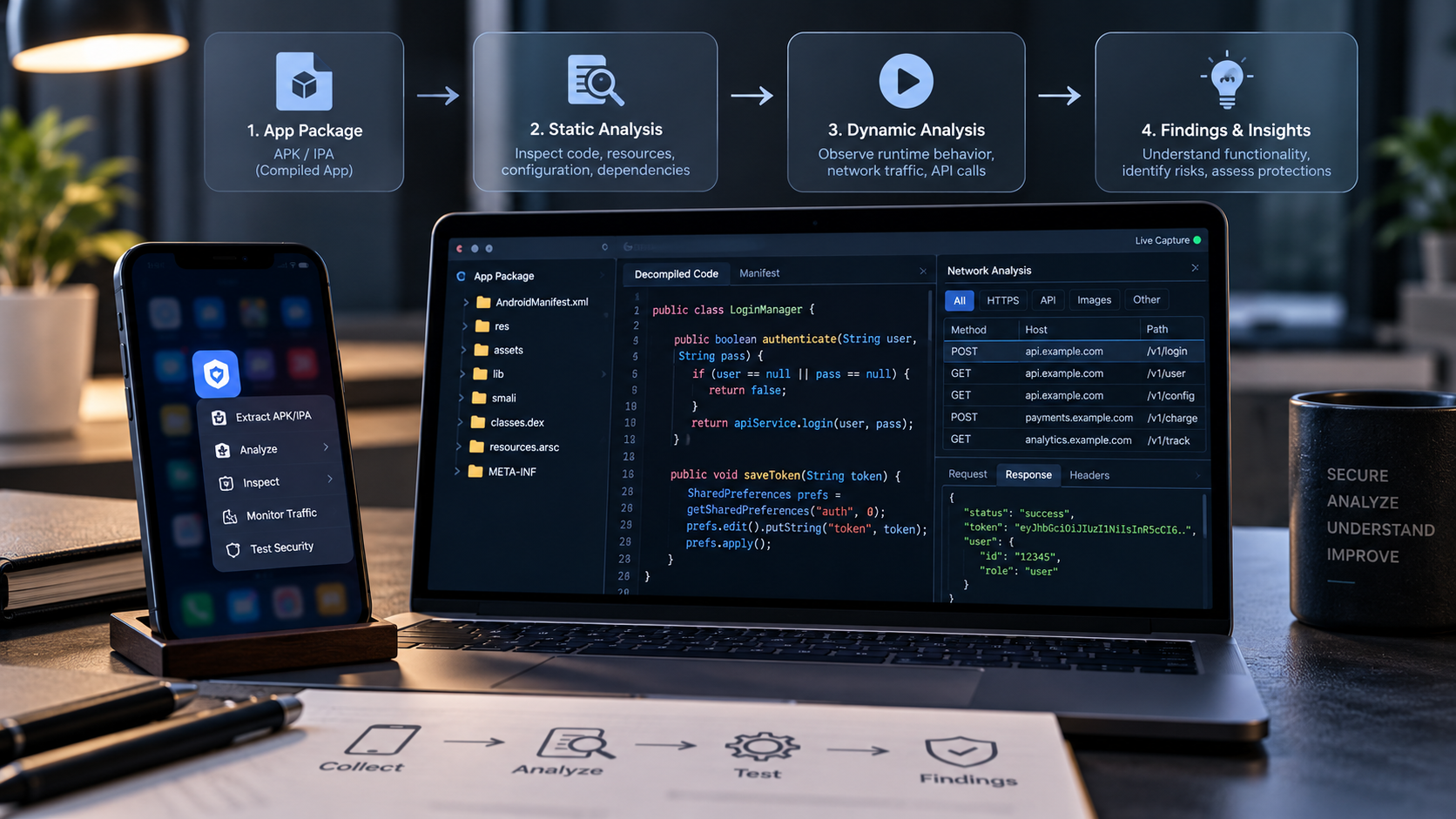
The reverse engineering workflow, step by step
Not every assessment needs every stage, and stages are often repeated or combined.
Step 1: define the scope and get the right build
Establish which app version and environment are in scope, what the assessment should find out and what access is authorised. Starting material may be a released package, a test build, documentation, API specifications or test accounts. Source code makes some checks easier, but black-box analysis is often still possible. OWASP's guide distinguishes black-box testing (no information about the app), white-box testing (full knowledge) and gray-box testing (some information, usually credentials).
Record the app version and where the build came from; the test device and operating system version; whether the test is black-, gray- or white-box; the allowed accounts, APIs and data; and anything prohibited or needing extra approval. A finding only means something when the tested version and conditions are clear.
Step 2: inspect the package and its metadata
The first pass looks at what the package contains: compiled code, resources, metadata, configuration, native libraries, bundled assets and dependency information. Ask which components and third-party libraries are present, whether development or test artefacts were left in, whether any hard-coded values look sensitive, and whether local databases, documents or configuration choices need closer review. A URL or a public SDK identifier is not automatically a vulnerability; the question is whether a value is sensitive and what it grants.
Step 3: run static analysis
Decompilers, disassemblers, dependency scanners and manual review show how the app implements important behaviour: authentication and session logic, client-side access checks and feature flags, cryptographic APIs and key material, local data handling and logging, network configuration and API clients, permissions, entry points and third-party libraries. Static analysis finds suspicious patterns but cannot always prove exploitability: a value that looks like a key may be public by design, and a client-side check may be backed by a server control. Treat findings as hypotheses to validate, not confirmed vulnerabilities.
Step 4: map the app's behaviour and data flows
Use the app with an authorised test account and record its main workflows. For each important operation, note what the user does, what the app sends or reads, which backend service is involved, where the authorisation decision is made, what is returned or stored, and what should happen if the user lacks permission or the request fails. This ties implementation details to security requirements: a screen may hide a paid feature, but the real question is whether the backend checks entitlement before returning the content.
Step 5: run dynamic analysis
Observe the app running in an authorised test environment: its behaviour, logs, file activity, network calls and responses to controlled conditions. Dynamic analysis answers questions static review cannot: does sensitive data land in logs or temporary files, are expired sessions handled correctly, are unexpected responses handled safely, does the app rely on a local decision for a sensitive operation, and does runtime behaviour match what the code suggests? It only covers the paths you actually exercise; one clean screen proves nothing about the rest.
Step 6: review network communication and API authorisation
Mobile apps depend on backend APIs for accounts, content and transactions, so the network layer is central. In a permitted environment, check that sensitive traffic uses properly configured encrypted transport, that protected operations require authentication, that the server checks authorisation for the specific resource and action, that responses carry only what the user needs, that inputs and identifiers are validated, that rate limits apply, and that expired or revoked sessions are rejected.
The key test is to exercise the backend independently of the app's interface. If an endpoint returns protected data to an unauthorised request, hiding the screen or obfuscating the client fixes nothing. Visibility can be limited by encryption, certificate validation or the test setup; if traffic cannot be inspected, record the limitation rather than claiming the network layer was fully tested.
Step 7: validate each hypothesis
A possible issue becomes a finding when it can be demonstrated safely and repeatably. If static analysis suggests a subscription is checked locally, use a controlled test account to verify whether the backend independently checks entitlement before returning premium content. A good validation states the expected security behaviour, defines the test conditions, reproduces the behaviour, records evidence without exposing real user data, assesses practical impact and confirms whether an independent control changes the outcome. Do not present a theoretical weakness as an exploit, and do not dismiss a serious issue because one path failed to reproduce it.
Step 8: report findings and retest fixes
Each finding should give a clear title and affected component, the tested version and conditions, a concise description, evidence and reproduction steps within scope, likely security and business impact, recommended remediation, and a retest result after the fix. Prioritise by realistic impact, exploitability, affected assets and exposure, not by how clever the technique looked.
Common tool categories
Tool choice depends on the platform, the compiled format and the question being asked. OWASP's testing guide catalogues the common ones, for example jadx (a Dex and Java decompiler), Ghidra (a disassembler and decompiler from the US National Security Agency), Frida (dynamic instrumentation) and intercepting proxies such as Burp Suite and mitmproxy for network analysis. Whatever the tool, validate its output rather than treating it as a verdict.
What can you actually recover?
| Item | What may be possible | Main limitation |
|---|---|---|
| App structure | Identify components, resources and some dependencies | Build formats and packaging vary |
| Source-like code | Readable reconstructions of some compiled logic | Names, comments, types and structure may be lost |
| API endpoints | Service URLs and request patterns | Finding an endpoint does not grant access |
| Embedded secrets | Hard-coded credentials or keys that are actually included | Not every identifier is secret; some values are absent |
| Local resources | Bundled assets and some runtime data | Sensitive runtime data may need more access |
| Business logic | Some rules from code and behaviour | Logic is often split between client and backend |
| Network behaviour | Requests and responses in suitable test conditions | Encryption and runtime limits reduce visibility |
| Runtime checks | Some client-side controls | Depends on device access and test conditions |
| Original source project | Rarely recoverable exactly | Build artefacts do not preserve every source detail |
The key distinction is between recovering implementation details and recovering protected information. A tester may understand exactly how the app builds a request without being able to reach another user's account; sound server-side authorisation keeps that boundary.
When is reverse engineering feasible, and when is it limited?
Some analysis is usually possible when an analyst has the app, suitable tools, knowledge and time. It is easier when a package is available, resources and compiled structures are readable, common libraries and formats are used, the app can run in an authorised environment, objectives are clear, and security decisions are visible in client code.
It gets harder or less conclusive in three situations:
- The information is not in the app. If a privileged server credential never ships to the client, no amount of package analysis will find it. That absence is a real architectural protection. Likewise, a rule enforced only on the backend shows how an operation is requested, not how to authorise it.
- The information is present but hard to interpret. Optimisation, obfuscation, native code and complex control flow make analysis slower and need more skill, runtime evidence or different tools, but do not guarantee the logic stays hidden.
- The environment does not expose the behaviour. A feature may depend on account state, server responses, hardware or services the tester cannot reach. The right conclusion is that it could not be fully assessed under those conditions, not that it cannot be reverse engineered.
These factors change cost and reliability; they are not a hard line between possible and impossible. A good report records the limits and what extra access would resolve them.
Does obfuscation stop reverse engineering?
No. Obfuscation renames identifiers, transforms control flow and otherwise makes reconstructed code less useful. OWASP's guidance puts it plainly: obfuscation "will not stop someone with enough time and budget from reverse engineering your app." It is still worth using where an app holds valuable client-side logic or tampering would be costly, but never as the main protection for credentials, private data or authorisation.
OWASP's MASVS treats obfuscation, anti-tampering and runtime protection as a defence-in-depth layer chosen by risk, which augments and does not replace baseline security controls, and its MAS-R testing profile says the same. A practical strategy combines release hardening and obfuscation to raise analysis cost, server-side authorisation for data and sensitive operations, secure storage and key management, integrity signals and runtime defences where the threat model justifies them, and manual and automated testing to prove they work.
Is reverse engineering legal?
It depends on where you are, what you analyse and what you do with it, so get written authorisation and legal advice for anything beyond your own apps. A few reference points:
- European Union. The Software Directive lets a lawful user observe, study or test how a program works, allows decompilation where it is indispensable for interoperability with an independently created program, and voids contract terms that override those rights.
- United States. A Copyright Office exemption to the DMCA's anti-circumvention rule, renewed in October 2024, covers good-faith security research, but it is not a safe harbour: other laws such as the Computer Fraud and Abuse Act can still apply.
- India. The Copyright Act permits acts needed for interoperability when the information is not otherwise readily available, allows observing, studying or testing a program, and permits security testing of a protected work with the owner's authorisation.
- App terms. App store licences commonly prohibit reverse engineering except where the law prevents that restriction, as Apple's standard licence agreement does.
Testing your own app, or a client's app under a signed scope, is the safe path.
Common mistakes in reverse engineering assessments
- Treating decompilation as proof of a vulnerability. Readable code reveals implementation; impact still has to be shown.
- Assuming an API is secret because only the app calls it. Endpoints are discoverable; protect them with authentication, authorisation, validation and abuse controls.
- Relying only on scanners. They miss business-logic flaws and report issues that are not exploitable in context.
- Testing only the interface. A hidden button proves nothing about the API behind it.
- Claiming a control cannot be bypassed. State what was tested and what remains uncertain.
- Skipping retests. Confirm the original issue is fixed and nothing nearby broke.
A practical assessment checklist
Scope and preparation
- Target app, version and test environment are documented.
- Written authorisation and testing boundaries are clear.
- Test accounts and non-production data are available.
- Sensitive workflows and assets are identified.
Static review
- Package contents, resources and configuration reviewed.
- Embedded credentials and leftover test artefacts investigated.
- Client-side authentication and authorisation assumptions reviewed.
- Dependencies and cryptographic use considered.
Runtime and API review
- Important workflows exercised in a controlled environment.
- Local storage and logs checked for sensitive data.
- API authentication and resource-level authorisation tested.
- Invalid, expired and revoked sessions tested.
- Limits on network visibility or device access recorded.
Reporting and remediation
- Findings include evidence, impact and recommended fixes.
- Severity reflects realistic risk and affected assets.
- Critical findings have an owner.
- Fixes are retested, and unassessed areas are documented.
When to bring in a professional assessment
Self-assessment is useful for learning and routine checks. An independent review makes sense when an app handles sensitive records, money, paid content, business-critical workflows or a large user base; before a major release; after big authentication or API changes; when an incident is suspected; or when customers and partners need evidence. Ask any provider exactly which parts of the client, APIs, authentication flows and backend are in scope, because a review of the package alone may not assess the whole product. To prepare, list your most sensitive workflows, identify the related APIs, and gather the correct test build and test accounts.
How eCorpIT can help
eCorpIT is a Gurugram-based technology organisation, founded in 2021, assessed at CMMI Level 5 and MSME certified, with senior-led engineering teams working across AWS, Microsoft and Google platforms. Our cybersecurity services include fixed-scope mobile application penetration testing for iOS and Android, with runtime analysis, reverse engineering, secure storage validation and API authorisation testing, followed by prioritised fixes and retesting. Talk to us at /contact-us/.
Last updated: 29 October 2026.