On this page · 11 sections
- The 2026 framing
- What "Managed Workflow" and "Bare" actually mean in 2026
- When Managed Workflow wins
- When Bare React Native wins
- The migration path between the two
- EAS Build, EAS Submit, and Expo Updates: the production pipeline
- Cost and timeline implications
- Frequently asked questions
- A short closing note
- Further reading
- References
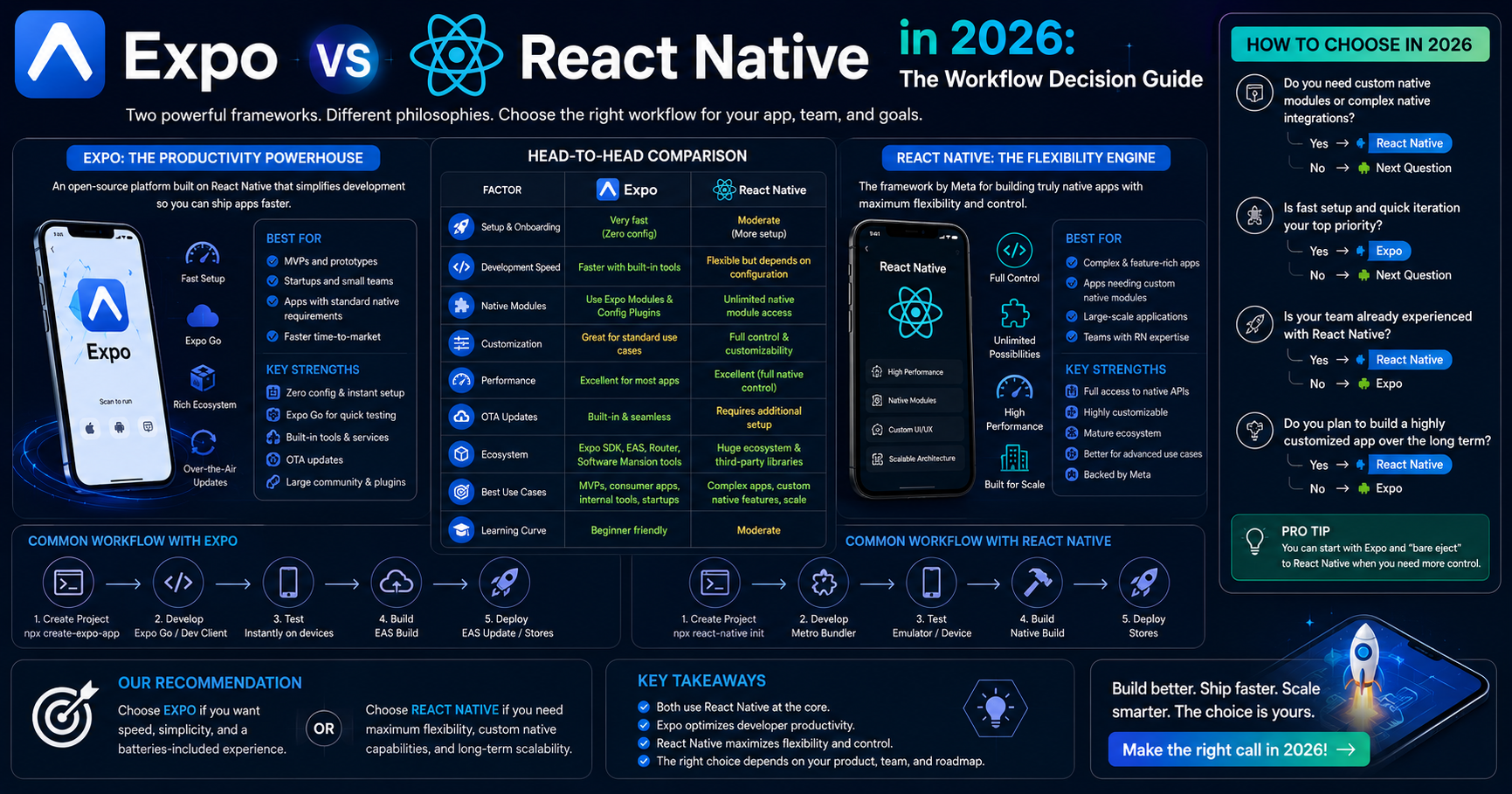
Summary. In 2026, Expo Managed Workflow fits 80%+ of new React Native builds. SDK 50 and later removed almost every old reason to "eject to bare React Native." EAS Build, EAS Submit, and Expo Updates form a production-grade pipeline that beats most custom-built equivalents. Bare React Native is the right call when you need custom native modules outside the Expo SDK, when you are extending an existing bare RN codebase, or when you have a specific native-platform optimisation that Expo cannot accommodate. This guide gives you the decision framework, the workflow comparison, and the migration path between the two.
Talk to eCorpIT about your build · Hire React Native Developers
The 2026 framing
Two years ago the Expo-vs-bare-RN conversation was lively. In 2026 it is mostly settled. Three things changed.
Expo SDK 50 and later added EAS Build as the default build system. Cloud-based iOS and Android binary generation without local Xcode or Android Studio. The bare-RN "I need to control the build process" argument has lost most of its force.
Expo Updates became production-grade. Over-the-air updates with rollback, regional rollout, A/B testing, and developer ergonomics that beat most custom-built solutions. The bare-RN "I need OTA control" argument is mostly gone.
Expo's native-module ecosystem expanded. SDK 50 onward includes most of the native capabilities that previously required ejecting: background tasks, in-app purchases, advanced camera, video processing, advanced auth flows. The bare-RN "I need this specific native module" argument now applies to a much smaller set of cases.
The result: in 2026, Managed Workflow is the right starting point for almost every new React Native build. Bare is reserved for specific cases the framework below covers.
What "Managed Workflow" and "Bare" actually mean in 2026
Clear definitions, since the terms have evolved.
Expo Managed Workflow. Your React Native app uses the Expo SDK for native module access. You write JavaScript or TypeScript. EAS Build compiles iOS and Android binaries in the cloud. EAS Submit handles store submission. Expo Updates handles OTA. You never touch Xcode or Android Studio for the build process. Custom native modules require config plugins (a documented Expo pattern) rather than direct Xcode or Android Studio modification.
Bare React Native (formerly "eject"). Your React Native app exposes the iOS and Android project files directly. You can modify Xcode and Android Studio settings freely. Custom native modules can be written directly without the config-plugins layer. You bear the responsibility of maintaining the native build configurations across React Native version upgrades.
The Managed Workflow is a constraint that produces better ergonomics. The Bare workflow is freedom that produces more maintenance burden. The right choice depends on which trade-off fits your build.
When Managed Workflow wins
Six buyer situations where Expo Managed Workflow is the right call.
Green-field React Native build with mainstream requirements. Auth, payments, push, social login, camera, video, maps, in-app subscriptions, AI/LLM features — all covered by SDK 50+. The Managed Workflow ships these faster than bare with less maintenance overhead.
Faster onboarding for new engineers. Engineers can clone the repo, run npx expo start, and have a working app on a real device in 5 minutes. Bare RN onboarding involves Xcode setup, Android Studio setup, native-build troubleshooting. The Managed Workflow saves 1–3 days per engineer.
Multi-engineer team coordination. Managed Workflow removes most "works on my machine" issues. Native-build environments differ across macOS versions, Xcode versions, and Android Studio configurations. Cloud-based EAS Build eliminates this.
OTA-update-heavy product strategy. Expo Updates is the most mature OTA solution in mobile. Bare RN OTA solutions (CodePush, Microsoft App Center retiring, custom-built) lag behind Expo Updates on developer ergonomics and reliability.
Smaller team with limited DevOps capacity. Managing CI/CD for bare RN across iOS and Android requires meaningful DevOps engineering time. EAS Build handles this. For 2–5 engineer teams, the time saving is significant.
Continuous version upgrades expected. React Native ships major versions every 6–8 months. Managed Workflow upgrades are usually npx expo upgrade plus minor config changes. Bare upgrades require manual native-project file updates and frequent regression testing.
When Bare React Native wins
Four buyer situations where Bare is the right call.
Custom native module not available via config plugins. Some specific native SDKs (legacy hardware integrations, niche audio/video codecs, custom Bluetooth protocols) require direct native code without the Expo config-plugins pattern. Bare gives you full Xcode and Android Studio access.
Extending an existing bare React Native codebase. Migrating an existing bare codebase to Managed Workflow is a meaningful effort and not always worth it. For mature bare codebases that work, staying bare is usually right.
Specific native-platform optimisation. Edge-case performance work that requires direct platform tuning. ARKit beyond what expo-camera supports, custom audio processing pipelines, low-latency Bluetooth flows.
Specific legacy native dependency. Some enterprise codebases include legacy iOS and Android libraries that have not been wrapped in Expo modules. Bare keeps the integration straightforward.
For most new builds in 2026, none of these conditions hold. Managed Workflow is the default.
The migration path between the two
A useful pattern: start Managed, migrate to Bare if specific requirements emerge.
Start with Managed Workflow. Most builds find that the Expo SDK covers their needs through to launch and beyond.
Adopt config plugins early. If your build requires a custom native module that has a community-maintained config plugin (e.g., RevenueCat, Sentry, advanced biometrics), adopt the config-plugins pattern rather than ejecting. Most teams never need to leave Managed.
Eject only when a specific blocker emerges. If a specific native integration genuinely cannot be done via Expo SDK or config plugins, eject. The ejection process is documented and straightforward.
Eject is one-directional in practice. Re-managing a bare codebase is technically possible but rarely worth the effort. Treat the ejection decision as a long-term commitment.
This pattern lets most builds stay in Managed Workflow for the entire lifecycle, while preserving the option to eject if a genuine native requirement emerges.
EAS Build, EAS Submit, and Expo Updates: the production pipeline
Three production capabilities that closed the bare-RN advantage in 2024–2025.
EAS Build. Cloud-based iOS and Android binary builds. No local Xcode or Android Studio required. Build profiles for development, preview, and production. Multiple binary types per platform (App Store, Play Store, internal distribution, simulator). Workflow integrations with GitHub Actions, GitLab CI, Bitbucket Pipelines.
EAS Submit. App Store and Play Store submission from the command line. Handles provisioning profiles, code signing, store metadata. Saves the historically painful "submission day" overhead.
Expo Updates. OTA updates with rollback, regional rollout, A/B testing, and developer ergonomics. Per the Apple Developer Program guidelines, OTA updates work for JavaScript code paths but not for content gates or feature flag bypasses. Expo Updates respects this.
Together, the three remove the bare-RN advantages that defined the conversation in 2022–2023. For most builds in 2026, the production pipeline is a reason to stay Managed, not to leave it.
Cost and timeline implications
The workflow choice has measurable cost and timeline impact.
Managed Workflow saves 10–20% of total engineering hours on a typical build. Faster engineer onboarding, less DevOps overhead, faster builds, less native-build troubleshooting. For a $40K build, that is $4K–$8K of saved engineering cost.
Managed Workflow ships 1–2 weeks faster on a typical MVP. The native-build setup time that bare requires is absorbed by EAS Build.
Bare Workflow adds maintenance overhead of 5–15% of ongoing engineering time. React Native version upgrades, native-dependency upgrades, OS-version compatibility testing all take longer in bare.
For most builds, the Managed Workflow's cost and timeline advantages compound across the lifecycle.
Frequently asked questions
A short closing note
The Expo-vs-React-Native decision in 2026 has a clear default: Managed Workflow for new builds, bare for specific cases the framework above covers. The Expo ecosystem has matured to the point where the historical bare-RN advantages have largely closed. For most builds, Managed Workflow saves engineering time, reduces maintenance overhead, and ships faster.
If you want a senior read on which workflow fits your specific build, that is what we do.
Further reading
References
Page last reviewed by Manu Shukla, Founder, eCorpIT, on 30 May 2026. Next review: August 2026.