

On this page · 11 sections
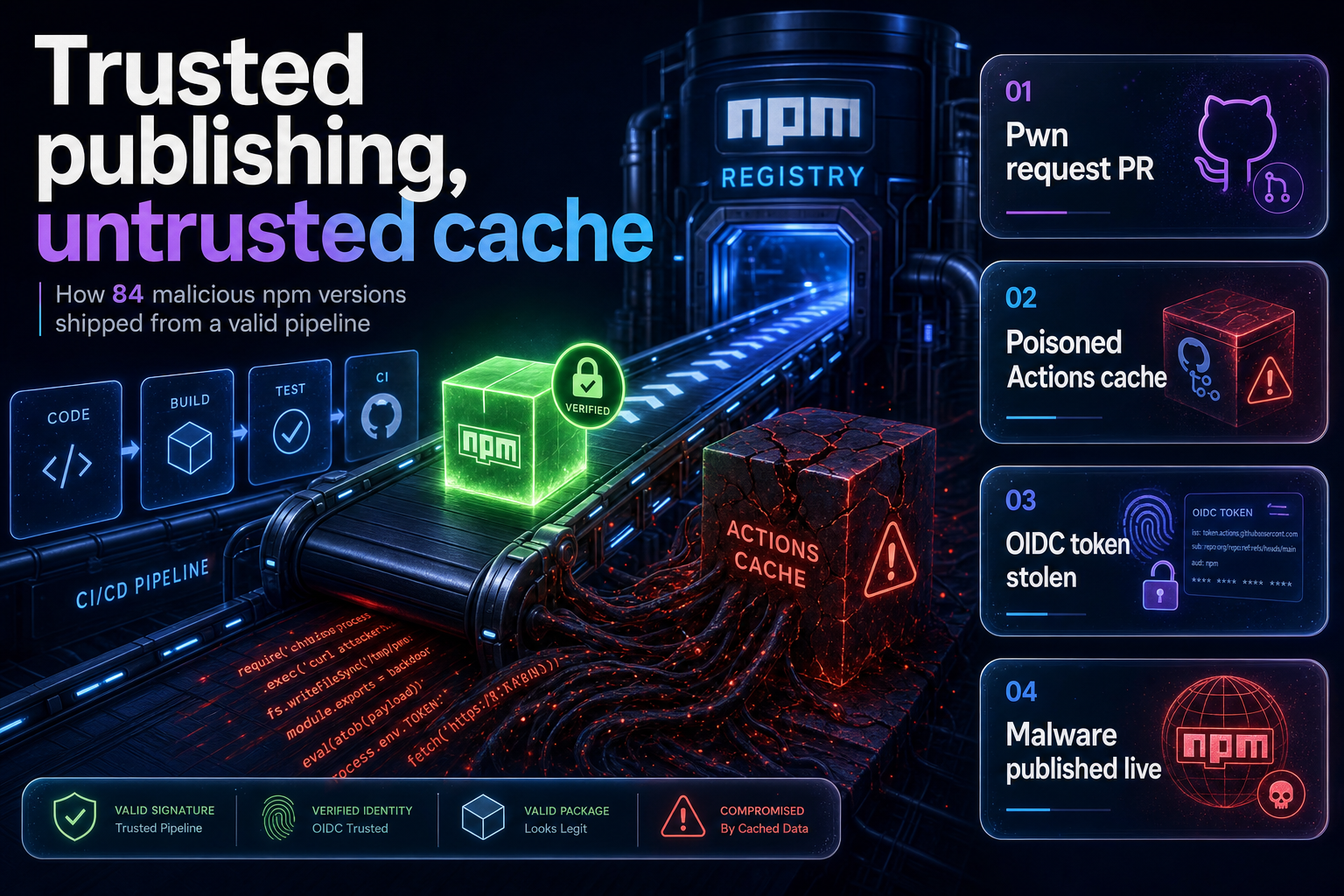
Summary. On 11 May 2026, between 19:20 and 19:26 UTC, an attacker published 84 malicious versions across 42 @tanstack/* packages to npm. No npm token was stolen, no maintainer was phished, and the release workflow was never modified. The publishes were authenticated by TanStack's own OIDC trusted-publisher binding, which is the control that is supposed to make stolen-token attacks impossible. An external researcher at StepSecurity reported it 26 minutes after the first publish, and TanStack needed 1 hour 43 minutes from first publish to deprecate all 84 versions. IBM puts the global average cost of a data breach at USD 4.4 million in its Cost of a Data Breach Report 2025, a 9% decrease year over year. The lesson is narrow and worth acting on: OIDC removed the long-lived token, but it did not remove the ability of any code running in the release job to mint a publish credential. Since the incident, GitHub and npm have shipped four separate controls that break this exact chain: npm staged publishing with per-publish 2FA review, actions/checkout v7 refusing fork checkouts in pull_request_target (18 June 2026, backported to older majors on 16 July 2026), read-only Actions caches for untrusted triggers (26 June 2026), and npm v12 turning install scripts off by default (8 July 2026). Most teams have turned on none of them.
This is a working guide to the chain and the configuration that closes it. The facts come from TanStack's own postmortem and hardening writeup, plus GitHub and npm primary documentation.
What actually happened
The attack did not begin with a stolen credential. It began with a pull request.
An attacker forked TanStack/router, renamed the fork so it would not surface in fork-list searches, and pushed a malicious commit carrying a roughly 30,000-line bundled JavaScript payload. The commit message was prefixed with [skip ci] to suppress CI on the push itself. The next day the attacker opened a pull request against main.
Two workflows auto-ran on that PR because they used the pull_request_target trigger, which does not require first-time-contributor approval. The repository's main pr.yml workflow, which uses the ordinary pull_request trigger, correctly stayed blocked pending an approval that never came. One of the pull_request_target workflows, bundle-size.yml, checked out the fork's PR-merge ref and ran a build. That executed the attacker's code inside the base repository's trust context.
The payload's job was not to steal anything. It wrote data into the pnpm store under a cache key that the legitimate release workflow would later compute and restore: Linux-pnpm-store-${hashFiles('**/pnpm-lock.yaml')}. When the job ended, the actions/cache post-step dutifully saved 1.1 GB of poisoned pnpm store to the default-branch cache scope. The attacker then force-pushed the PR back to the current main HEAD, making the visible PR a zero-file no-op, closed it, and deleted the branch. The poison stayed in the cache.
Eight hours later a maintainer merged an unrelated PR. The release workflow ran on main, restored the poisoned cache exactly as designed, and attacker binaries were on the runner.
Those binaries located the GitHub Actions Runner.Worker process via /proc/*/cmdline, read /proc/<pid>/maps and /proc/<pid>/mem to dump the worker's memory, and extracted the OIDC token that the runner mints lazily in memory when id-token: write is set. They then POSTed directly to registry.npmjs.org with that token. The workflow's own "Publish Packages" step never ran; it was skipped because the tests failed.
The publishes were authenticated as coming from TanStack/router release.yml@refs/heads/main. As far as npm was concerned, they were legitimate.
Why trusted publishing did not help
npm trusted publishing does exactly what it advertises. It creates an OIDC trust relationship between npm and your CI provider so that no long-lived publish token exists to steal. npm's documentation is explicit that this eliminates a large class of attacks: tokens that leak into CI logs, sit on developer laptops, or persist until someone remembers to rotate them.
TanStack had all of it configured correctly. Their hardening post is blunt about the result:
"The attacker managed to engineer a path where our own CI pipeline stole its own publish token for them, at the exact moment it was created, by way of a cache that everyone in the chain implicitly trusted."
The gap is structural, not a misconfiguration. id-token: write is a job-level permission, not a step-level one. Once a job carries it, every process in that job can ask the runner for an OIDC token, and the runner will mint one. Your build step can. Your test step can. A transitive dependency's postinstall script can. A binary restored from a cache can.
Tanner Linsley, the creator of TanStack, put the design problem plainly in the postmortem's lessons-learned section:
"OIDC trusted-publisher binding has no per-publish review. Once configured, any code path in the workflow can mint a publish-capable token."
That is the sentence to take to your own release pipeline. Trusted publishing moves the credential from a secret store into the job's ambient capability set. If arbitrary code can run in that job, trusted publishing has not reduced your blast radius; it has only changed where the credential lives.
npm's own documentation, meanwhile, still tells readers that OIDC credentials "cannot be extracted or reused". The TanStack incident is a working counter-example to the first half of that claim.
The chain, link by link
Three vulnerabilities were chained. TanStack's postmortem is clear that each was necessary and none alone was sufficient. That matters, because it means you only have to break one link.
| Link in the chain | What it did | Control that closes it now |
|---|---|---|
| Fork PR auto-runs a privileged workflow | pull_request_target skipped first-time-contributor approval |
Use pull_request; move privileged work to workflow_run |
| Privileged workflow checks out fork code | bundle-size.yml checked out refs/pull/<n>/merge and built it |
actions/checkout v7 refuses fork PR checkouts (18 June 2026) |
| Untrusted job writes the shared cache | actions/cache post-step saved to the default-branch scope |
Read-only cache tokens for untrusted triggers (26 June 2026) |
| Release job restores the poisoned cache | release.yml restored 1.1 GB of attacker-controlled store |
actions/cache/restore; no caching in release builds |
| Attacker code mints an OIDC token | id-token: write is job-wide, minted from runner memory |
Isolate id-token: write in a minimal publish-only job |
| Token publishes straight to the registry | Direct POST to registry.npmjs.org, bypassing the publish step |
Stage-only trusted publisher; human 2FA approval |
Two details deserve emphasis. First, actions/cache's post-job save is not gated by the permissions: block, because cache writes use a runner-internal token rather than the workflow GITHUB_TOKEN. Setting permissions: contents: read did not block the cache write, and TanStack's authors had in fact attempted a trust split with a comment in the YAML noting the intent to keep the benchmark job untrusted and read-only. The split was right in spirit and did nothing.
Second, none of this was novel research. The cache-poisoning technique was published by Adnan Khan in May 2024. The memory-extraction script was the same one used in the tj-actions/changed-files compromise of March 2025, reused verbatim, attribution comment included. GitHub Security Lab has warned against pull_request_target plus untrusted checkout since August 2021. The attacker recombined public work. The pattern is familiar from other ecosystems: a published proof of concept sits unactioned until someone weaponises it, which is what happened with the Langflow RCE and AI agent framework hardening.
What the platform changed after 11 May 2026
The useful part of this story is that the ecosystem moved, and most of the movement landed in the last 30 days. If you last looked at this problem in May, your mental model is out of date.
| Date | Change | What it breaks |
|---|---|---|
| 20 May 2026 | npm trusted-publisher configs require explicit allowed-actions selection | Blanket publish rights on a CI binding |
| 18 June 2026 | actions/checkout v7 refuses fork PR checkouts under pull_request_target |
The pwn-request entry point |
| 26 June 2026 | Read-only Actions cache tokens for untrusted triggers | Cache poisoning across the fork/base boundary |
| 8 July 2026 | npm v12 GA: allowScripts off, --allow-git none, --allow-remote none |
Install-time payload execution |
| 16 July 2026 | Checkout enforcement backported to all supported majors | Workflows still pinned to @v4, @v5 floating tags |
The 26 June change is the closest thing to a direct fix. GitHub now issues read-only cache tokens when the triggering event is untrusted and the cache scope comes from the shared default-branch SHA. GitHub's changelog describes the exact TanStack pattern: workflow code an external actor can influence "could write to the default-branch cache, and a trusted workflow such as push or schedule would later restore those poisoned entries". push, schedule, workflow_dispatch, repository_dispatch and a few others keep read-write caching, as do non-default-branch scopes like pull_request and release.
The 16 July backport is worth a calendar note. Workflows pinned to a floating major tag such as actions/checkout@v4 picked up the enforcement automatically yesterday. Workflows pinned to a specific SHA did not, and will need a Dependabot bump. This is the one place where SHA pinning, which is otherwise correct, delays a security fix rather than delivering one.
The npm v12 defaults are underrated. TanStack's malware worked by having npm resolve a malicious optionalDependencies entry pointing at a github: commit in the fork network, then executing its prepare lifecycle script on install. On npm v12 defaults, both of those steps are off: allowScripts defaults to off, so lifecycle scripts do not run unless allowlisted, and --allow-git defaults to none, so git dependencies are not resolved at all. A consumer on npm v12 defaults who installed an affected version would very likely not have executed the payload. That is an assessment of the mechanism rather than a tested result, and it is not a reason to skip the other controls, but it does mean the install-side default is now working for you. We covered the migration in our guide to npm v12 install-script approval in CI/CD.
The config that stops it
Here is the shortest path to breaking the chain, in the order we would do it for a client.
1. Make your trusted publisher stage-only
This is the highest-value change and almost nobody has made it. npm shipped staged publishing, which adds an approval step before a package goes live. Instead of npm publish, CI runs npm stage publish, and a maintainer must review and approve with 2FA via the CLI or npmjs.com before the version becomes installable.
Crucially, the trusted-publisher configuration now carries an allowed-actions setting. You select which actions the binding may perform: npm publish, npm stage publish, or both. Configure it for npm stage publish only.
Now re-run the TanStack attack in your head. The malware still poisons the cache. It still extracts the OIDC token from runner memory. It still POSTs to the registry. And the registry accepts the request, stages the package, and waits for a human with a 2FA device. The 6-minute silent compromise becomes a review queue item and an unexpected notification.
Configuration lives in package settings on npmjs.com, not in your repository. In your workflow:
- run: npm stage publish
Two constraints from npm's documentation. Staged publishing needs npm CLI 11.15.0 or later and Node 22.14.0 or later. The package must already exist on the registry; you cannot stage a brand-new package. Note also that npm stage publish itself does not require 2FA; the approval step does.
npm is moving the whole ecosystem this way. From around January 2027, 2FA-bypass granular access tokens lose the ability to publish directly, and their publishing surface drops to staging a publish that only goes public after a human 2FA approval.
2. Isolate id-token: write in a job that does nothing else
If a job has id-token: write, treat every process in it as publish-capable. So put nothing in it.
Build and test in one job with no id-token permission. Upload the artifact. Publish from a second job that downloads the artifact, has id-token: write, and runs no build, no tests, no third-party actions, and no dependency install that executes scripts.
            name: Release

on:
  push:
    branches: [main]

permissions: {}

jobs:
  build:
    runs-on: ubuntu-latest
    permissions:
      contents: read
    steps:
      - uses: actions/checkout@11bd71901bbe5b1630ceea73d27597364c9af683 # v4.2.2
        with:
          persist-credentials: false
      - uses: actions/setup-node@v6
        with:
          node-version: '24'
          package-manager-cache: false
      - run: npm ci --ignore-scripts
      - run: npm run build
      - run: npm test
      - run: npm pack --pack-destination ./dist
      - uses: actions/upload-artifact@v4
        with:
          name: tarball
          path: dist/*.tgz

  publish:
    needs: build
    runs-on: ubuntu-latest
    environment: release
    permissions:
      id-token: write
      contents: read
    steps:
      - uses: actions/download-artifact@v4
        with:
          name: tarball
          path: dist
      - uses: actions/setup-node@v6
        with:
          node-version: '24'
          registry-url: 'https://registry.npmjs.org'
          package-manager-cache: false
      - run: npm stage publish dist/*.tgz
The environment: release line adds a second gate: GitHub deployment environments support required reviewers, so the publish job can block on a human before it even starts. permissions: {} at workflow level means every job starts with nothing and opts in.
One caveat on this shape. npm validates the trusted publisher against the workflow filename, and when workflow_call is involved the validation checks the calling workflow's name rather than the one containing the publish command. If you split releases across reusable workflows, id-token: write must be granted to both parent and child, and your npm configuration must name the right file.
3. Never cache in a release build
npm's own trusted-publishing documentation now carries the comment package-manager-cache: false # never use caching in release builds in its GitHub Actions example. Take it literally. A release job should install from a lockfile against the registry, not from a store that some other job wrote.
Where you do want caching in CI, use actions/cache/restore rather than actions/cache. The restore-only action has conservative defaults: explicit restore, no implicit write-on-exit. The auto-save behaviour of actions/cache is what let the write happen regardless of the permissions: block.
4. Delete pull_request_target from CI
The GitHub-recommended pattern for "I need to build untrusted PR code and then comment on the PR with the results" is two workflows. The first runs on pull_request in an unprivileged sandbox, does the build, and writes results to an artifact. The second runs on workflow_run, has write permissions and secrets, downloads the artifact, and posts the comment.
Treat artifacts from the untrusted job as untrusted data. Reading a PR number or a coverage percentage from an artifact is fine. Executing a binary built by the untrusted job inside the privileged workflow_run job recreates the whole problem.
TanStack removed every use of pull_request_target from their CI after the incident. Their post notes it was never in their CD pipeline, and they concluded it should not have been in CI either.
If you must keep it, actions/checkout v7 now fails on the insecure inputs by default, and the opt-out is an input named allow-unsafe-pr-checkout. GitHub deliberately named it to be easy to spot in code review and static analysis. If that string appears in a diff, it should stop the review.
5. Pin actions to a commit SHA, then keep them moving
TanStack pinned every action in the org to a commit SHA after the incident. Their reasoning is worth repeating: a retargeted tag has the same blast radius as cache poisoning, and they had just lived through cache poisoning.
The 16 July backport is the counter-argument in miniature. SHA pinning meant you did not get yesterday's security fix automatically. Pinning without Dependabot is not a security posture, it is a freeze. Pin, and run Dependabot.
6. Put zizmor in CI and CODEOWNERS on .github
zizmor is a static analyser for GitHub Actions workflows that flags the pull_request_target plus fork-checkout pattern, template injection, and credential persistence. TanStack's own assessment is that if zizmor had been running against the exploited workflow, there is a chance it would have flagged the pattern before any of this happened. It is a required PR check on their repos now.
Pair it with CODEOWNERS on the .github directory, restricting workflow changes to a small group. Workflow files are code that runs with your credentials. They are the most privileged code in the repository and should be reviewed like it.
7. Turn off token publishing entirely
Once trusted publishing works, go to package settings, Publishing access, and select "Require two-factor authentication and disallow tokens". The setting only affects traditional token authentication; the OIDC binding keeps working. Then revoke the automation tokens you no longer need.
While you are there, note npm's constraint: each package can only have one trusted publisher configured at a time, and npm does not verify the configuration when you save it. A typo in the workflow filename surfaces only when a publish fails.
If you consume packages rather than publish them
Most teams reading this are downstream, not maintainers. The controls are different.
Upgrade to npm v12 and keep the new defaults. Run npm approve-scripts --allow-scripts-pending to review and allowlist only the lifecycle scripts you actually need, then commit the allowlist to package.json. Every script you do not allowlist is an execution path an attacker cannot use. Build the check into your pipeline rather than a wiki page, for the same reason CI/CD checks fail silently when nobody is watching the output.
Adopt an install cooldown. TanStack upgraded every repo to pnpm 11 to inherit the ecosystem's install-cooldown behaviour, and their own framing is the honest one: it is not a fix, it buys a window. Given that the malicious versions were live for 20 to 26 minutes and fully deprecated inside 1 hour 43 minutes, a cooldown of even a few hours would have covered this entire incident. GitHub shipped a default package cooldown for Dependabot version updates on 14 July 2026.
Understand the removal timeline, because it sets your exposure. TanStack could not unpublish, because npm's policy blocks unpublishing when dependents exist. They deprecated within the hour, but deprecation does not stop an install. Actual tarball removal was npm's to do: the first package came off the registry about 2 hours 53 minutes after the first publish, the last at about 4 hours 35 minutes. Your lockfile is your control here, not the registry's.
Know what to look for. In this incident the fingerprint in a package manifest was an optionalDependencies entry pointing at a github: ref, plus a router_init.js of roughly 2.3 MB sitting in the package root and absent from the files array. Exfiltration ran over the Session messenger file-upload network, including filev2.getsession.org, which is end-to-end encrypted with no attacker-controlled command-and-control server, so domain blocking was the only network mitigation available.
If you installed an affected version on 11 May 2026, TanStack's guidance is to treat the install host as potentially compromised and rotate AWS, GCP, Kubernetes, Vault, GitHub, npm and SSH credentials reachable from it. The malware harvested from AWS IMDS and Secrets Manager, GCP metadata, Kubernetes service-account tokens, Vault tokens, ~/.npmrc, GitHub tokens and SSH private keys, then self-propagated by enumerating other packages the victim maintained and republishing them with the same injection.
TanStack issued an all-clear on 15 May 2026. Only the Router/Start repo was affected, every other TanStack package family was untouched, and every currently available version is safe to install.
What this costs to fix
The controls above are configuration, not engineering. Rough effort for a team with a working release pipeline:
| Control | Effort | Stops |
|---|---|---|
| Stage-only trusted publisher | 1 hour | Silent publish from a compromised runner |
| Split build and publish jobs | 4 to 8 hours | Any in-job code minting a publish token |
| Remove caching from release | 1 hour | Poisoned store reaching a release build |
Replace pull_request_target |
4 to 16 hours per repo | The pwn-request entry point |
| SHA-pin plus Dependabot | 2 to 4 hours | Retargeted-tag attacks |
| zizmor plus CODEOWNERS | 2 hours | The pattern reappearing later |
Call it two to four engineering days for a single-package repository, and one to two weeks for a monorepo with a real release pipeline. We budget that work at roughly ₹80,000 to ₹3,00,000 for an Indian senior engineering team, or about $4,000 to $15,000 at United States or European rates. Those are our own planning figures rather than a market survey. Set them against IBM's USD 4.4 million global average cost of a data breach, and against a credential-rotation exercise across every cloud account your CI can reach. The real cost is usually the rotation, not the config change.
India-specific considerations
For Indian product teams and the SaaS firms building for global customers from Gurugram, Bengaluru and Pune, two points matter beyond the engineering.
The Digital Personal Data Protection Act 2023 makes you the Data Fiduciary for personal data your systems process. A compromised build host with live AWS and GCP credentials is a plausible route to personal data, and the DPDP Act's breach-notification duty attaches to the fiduciary, not to the upstream open-source project whose package you installed. "Our dependency was compromised" is an explanation, not a defence. If your CI runners can reach production data stores, your supply-chain posture is a DPDP question.
Second, most Indian engineering organisations run CI on GitHub-hosted runners, which is what trusted publishing requires. npm's trusted publishing does not currently support self-hosted runners, on any provider. Teams that moved to self-hosted runners for cost reasons cannot use trusted publishing today and are still on long-lived tokens, which is the worse of the two positions. If that is you, staged publishing plus "disallow tokens" is not available as a pair, and the priority is a short-lived token with manual review rather than a permanent automation token in a secret store.
How eCorpIT can help
eCorpIT is a CMMI Level 5 certified engineering organisation in Gurugram, and our senior engineering teams do exactly this work: auditing GitHub Actions workflows for pwn-request and cache-poisoning patterns, splitting release pipelines so publish credentials are isolated, and moving npm packages onto stage-only trusted publishing with a human approval gate. We are an AWS, Microsoft and Google partner, and we design build and release systems aligned with DPDP Act 2023 requirements for teams shipping from India to global customers. The same senior-led review underpins our AI agent security and guardrails work. If your release workflow currently builds, tests and publishes in one job, that is a half-day conversation and a well-understood fix. Talk to our team about a CI/CD supply-chain review.
FAQ
References
- Postmortem: TanStack npm supply-chain compromise. Tanner Linsley, TanStack, 11 May 2026 (last updated 15 May 2026).
- Hardening TanStack After the npm Compromise. TanStack maintainers, 12 May 2026.
- Trusted publishing for npm packages. npm Docs.
- Staged publishing for npm packages. npm Docs.
- Safer pull_request_target defaults for GitHub Actions checkout. GitHub Changelog, 18 June 2026.
- Read-only Actions cache for untrusted triggers. GitHub Changelog, 26 June 2026.
- npm install-time security and GAT bypass2fa deprecation. GitHub Changelog, 8 July 2026.
- Keeping your GitHub Actions and workflows secure Part 1: Preventing pwn requests. Jaroslav Lobačevski, GitHub Security Lab, 3 August 2021.
- Dependabot version updates introduce default package cooldown. GitHub Changelog, 14 July 2026.
- Upcoming breaking changes for npm v12. GitHub Changelog, 9 June 2026.
- Cost of a Data Breach Report 2025. IBM and Ponemon Institute.
- zizmor: static analysis for GitHub Actions. zizmorcore.
- npm unpublish policy. npm Docs.
- Generating provenance statements. npm Docs.
- TanStack/router issue #7383. tracking issue opened by StepSecurity researcher ashishkurmi, 11 May 2026.
- The Digital Personal Data Protection Act, 2023. Ministry of Electronics and Information Technology, Government of India.
Last updated 17 July 2026.


