On this page · 16 sections
- What changed on June 9 — the mandatory technical shifts
- Why App Intents matters more than any single feature
- Comparison table 1 — SiriKit vs App Intents 2.0
- App Intents code — a working example
- The Foundation Models framework — Apple's new LanguageModel protocol
- Comparison table 2 — AFM 3 model tiers
- On-screen awareness — what your app must expose
- Designing for the dedicated Siri app
- Comparison table 3 — Build priorities by app type
- The economic angle — free PCC for Small Business Program developers
- The 95-day shipping plan
- Migration risks and rollback
- India and global developer notes
- FAQ
- How eCorpIT can help
- References
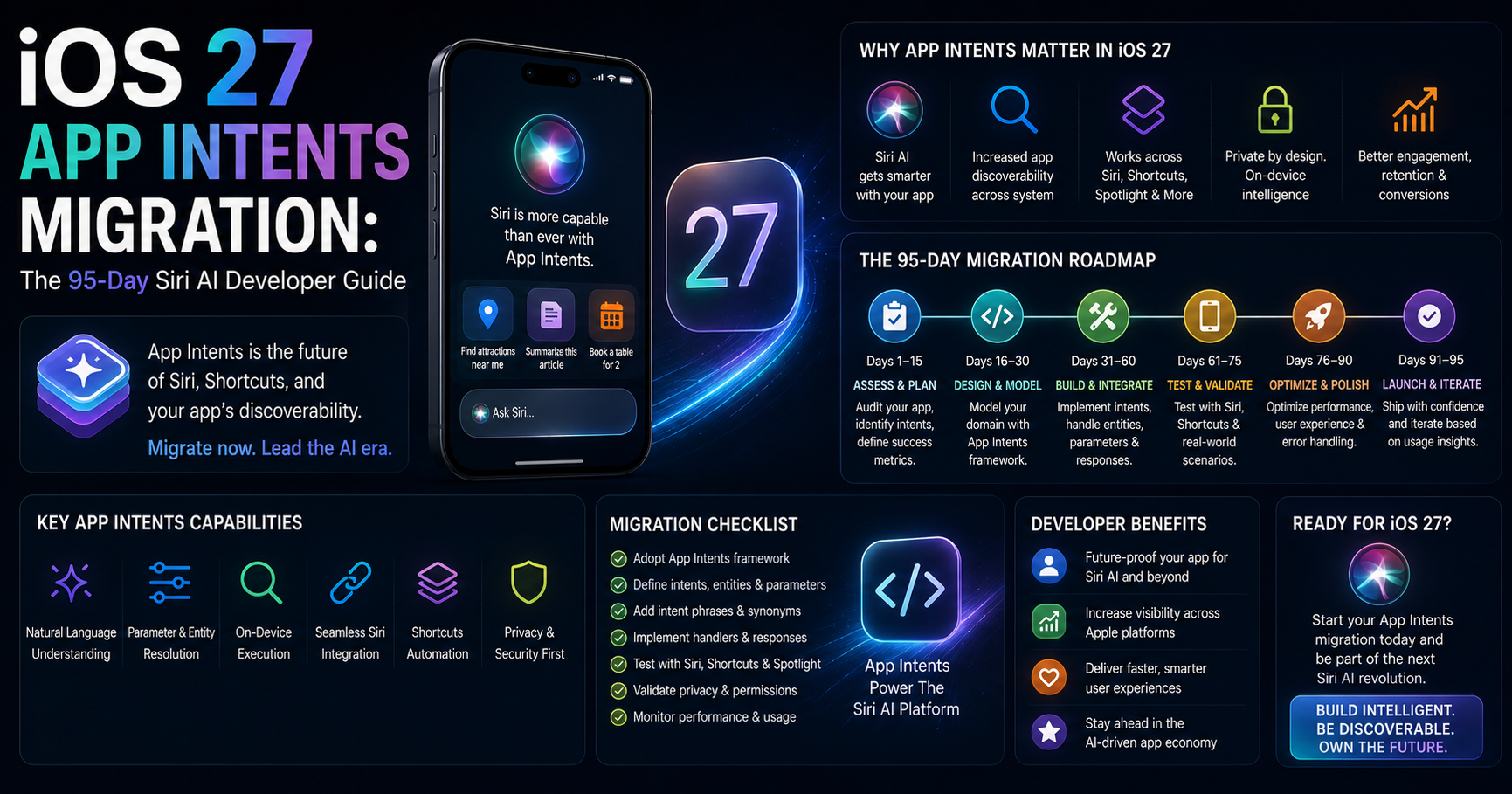
Summary. At WWDC 2026 on June 9, Apple formally deprecated SiriKit and made App Intents the only way Siri can call into a third-party iOS app. Existing SiriKit apps continue to function but now emit compile-time deprecation warnings; Apple has signalled a roughly two-to-three-year support window before removal. The replacement is App Intents 2.0, which adds richer entity types, streaming responses for long-running actions, multi-turn conversational follow-ups, and a new View Annotations API that lets users reference UI elements directly in Siri commands ("that photo," "this message"). On the model side, Apple shipped a public `LanguageModel` protocol in the Foundation Models framework — your app can call AFM 3 Core Advanced (a 20-billion-parameter multimodal sparse on-device model that activates 1-4 billion parameters per request), AFM Cloud Pro running on Nvidia GPUs in Google Cloud, or any third-party model that conforms. Developers enrolled in the App Store Small Business Program (under 2 million first-time downloads) get free Private Cloud Compute access at zero cloud API cost — a meaningful economic incentive against rolling your own Claude or GPT integration. iOS 27 ships publicly on September 14, 2026 — exactly 95 days from this guide's publication. Apps that ship without App Intents are invisible to the Gemini-powered Siri AI. This guide is the working developer playbook to get there — what to build, in what order, with code examples, a four-table technical reference, and a 13-week shipping plan.
The honest framing: this is the biggest mandatory iOS framework change in five years, and the deadline is real. Apps that miss App Intents adoption are not just slow to ship a new feature — they become functionally invisible to the new system-level assistant that users will increasingly rely on. The 95-day clock started ticking on June 9.
This guide is built for iOS engineers, technical co-founders, mobile team leads, agency development shops, and product managers responsible for App Store-listed iOS apps. The research draws on Apple's developer documentation, Apple's Foundation Models framework reference, the Apple newsroom announcement on developer tools, the WWDC 2026 platform sessions, and patterns observed across iOS engineering engagements in 2024-26. For broader context on the keynote announcements, see eCorpIT's WWDC 2026 analysis.
What changed on June 9 — the mandatory technical shifts
Five concrete shifts every iOS team needs to act on.
1. SiriKit is deprecated. Apple gave SiriKit a formal deprecation notice at WWDC 2026 (covered at TechTimes). Existing SiriKit code continues to compile but emits deprecation warnings in Xcode 27. Apple's signalled support window is approximately two to three years before removal. Apps that depend on SiriKit have a near-term modernisation deadline.
2. App Intents is mandatory for Siri AI integration. As Mac O'Clock's coverage puts it bluntly, an iOS app without App Intents is invisible to the Gemini-powered Siri AI. The new system-level assistant cannot call into your app, route user requests to your actions, or surface your content unless your app publishes App Intents.
3. App Intents 2.0 adds four major capabilities in iOS 27:
- Richer entity types (custom domain models exposed to Siri)
- Streaming responses for long-running actions (Siri can show "still working" UI)
- Multi-turn conversational follow-ups (Siri asks clarifying questions)
- View Annotations API — UI elements can be linked to data so users reference them naturally in voice ("that photo," "this row," "this message")
4. The Foundation Models framework gets a public `LanguageModel` protocol. Your app can now call Apple's AFM 3 Core Advanced on-device, AFM Cloud Pro on Private Cloud Compute, or any third-party model (Claude, Gemini, GPT, Llama) that conforms to the protocol. Swap providers without rewriting your inference code — this is the architectural change most working iOS teams will use most.
5. App Store Small Business Program developers get free PCC access. Developers with fewer than 2 million first-time App Store downloads who are enrolled in the Small Business Program can run inference on Apple's Private Cloud Compute at no cloud API cost. For small and mid-tier iOS teams, this is a multi-thousand-dollar-per-month savings versus rolling your own Anthropic, OpenAI or Google API integration.
Why App Intents matters more than any single feature
Three concrete operational consequences your team needs to internalise.
Discoverability. Users find apps through Siri AI suggestions, Spotlight semantic search, Shortcuts automation, the Lock Screen and now the new dedicated Siri app. Every one of these surfaces is powered by App Intents. An app without App Intents is one Siri AI cannot route users to.
Capability composition. Siri AI composes multi-step actions across multiple apps. "Find the photos Priya sent me on Sunday, make a poster, and AirDrop it to Mum" requires three apps to each publish App Intents that Siri AI orchestrates. Apps that publish intents become components of agentic workflows; apps that do not are dropped from the composition.
Hardware-tier accessibility. Apple Intelligence and Siri AI require iPhone 15 Pro or newer, M1 Mac/iPad or newer. The most demanding features need iPhone 17 Pro or iPhone Air with 12GB RAM. App Intents, however, function on every iOS 27 device — so the App Intents layer of your app extends value to iPhone 11+ users even though those devices cannot run Apple Intelligence locally.
Comparison table 1 — SiriKit vs App Intents 2.0
| Dimension | SiriKit (legacy) | App Intents 2.0 (iOS 27) |
|---|---|---|
| Declaration syntax | INIntent + Intents Extension | Swift AppIntent protocol |
| Setup complexity | High (Intent Definition file + extension target + handler classes) | Low (single Swift type) |
| Surfaces supported | Siri only (mostly) | Siri AI, Spotlight, Shortcuts, Widgets, Lock Screen, Action Button, Focus, dedicated Siri app |
| Multi-turn conversation | Limited | First-class support |
| Streaming responses | Not supported | Supported |
| View Annotations API | Not available | Available (UI elements linked to data) |
| Entity types | Constrained domains | Custom Swift entities with rich relationships |
| App without it on iOS 27 | Still works, deprecation warnings | Invisible to Siri AI — non-negotiable |
| Apple support window | ~2-3 years before removal | Future direction |
The decision rule for every iOS engineering team in 2026: existing SiriKit code stays operational while you migrate, but every new feature ships with App Intents only. Plan the SiriKit removal as a 12-18 month phased project.
App Intents code — a working example
A minimal App Intent that a meditation app might publish so users can say "Start a 10-minute breathing session" to Siri AI:
            import AppIntents
import FoundationModels

// 1. Declare a custom entity for breathing sessions
struct BreathingSession: AppEntity {
    static var typeDisplayRepresentation: TypeDisplayRepresentation = "Breathing Session"

    @Property(title: "Duration (minutes)")
    var durationMinutes: Int

    @Property(title: "Pattern")
    var pattern: String  // "Box", "4-7-8", "Coherent"

    static var defaultQuery = BreathingSessionQuery()
    var id: UUID
    var displayRepresentation: DisplayRepresentation {
        DisplayRepresentation(title: "\(durationMinutes)-minute \(pattern) breathing")
    }
}

// 2. Declare the App Intent that Siri AI calls
struct StartBreathingSession: AppIntent {
    static var title: LocalizedStringResource = "Start Breathing Session"
    static var description = IntentDescription("Begin a guided breathing session.")

    @Parameter(title: "Duration in minutes", default: 10)
    var minutes: Int

    @Parameter(title: "Breathing pattern", default: "Box")
    var pattern: String

    // Streaming response — Siri AI shows progress UI
    static var openAppWhenRun: Bool = true

    func perform() async throws -> some IntentResult & ProvidesDialog {
        let session = try await BreathingSessionManager.shared.startSession(
            duration: minutes,
            pattern: pattern
        )

        return .result(
            dialog: "Starting a \(minutes)-minute \(pattern) breathing session now."
        )
    }
}

// 3. Provide a multi-turn clarifying dialogue when ambiguous
struct StartBreathingSessionInteractive: AppIntent {
    static var title: LocalizedStringResource = "Start a breathing session"

    @Parameter(title: "How long?", requestValueDialog: "How many minutes?")
    var minutes: Int?

    func perform() async throws -> some IntentResult & ProvidesDialog {
        guard let duration = minutes else {
            throw $minutes.needsValueError("How many minutes?")
        }
        // ... start session ...
        return .result(dialog: "Starting your \(duration)-minute session.")
    }
}
Three things this example demonstrates. First, the declaration is a single Swift type — no extension target, no separate intent definition file. Second, the entity type (BreathingSession) gives Siri AI a domain model it can reference in conversation ("repeat that last one," "make it five minutes longer"). Third, the requestValueDialog enables multi-turn conversation — Siri AI asks clarifying questions when the user's first prompt is ambiguous.
The Foundation Models framework — Apple's new LanguageModel protocol
Apple's Foundation Models documentation covers the new public protocol. The framework provides a common interface for model inference across Apple's own models and any third-party provider that conforms.
The architectural significance: your inference code is portable. Swap from AFM 3 Core Advanced to Claude Sonnet 4.5 to Gemini 3.5 Flash without rewriting business logic — just point the protocol at a different provider.
            import FoundationModels

// Generate text from any conforming model
let session = LanguageModelSession()

let response = try await session.generate(
    prompt: "Summarise this user's recent activity in one sentence: \(userContext)",
    options: .init(
        maxTokens: 100,
        temperature: 0.7
    )
)

print(response.text)

// Use a specific model — Apple's own
let appleModel = AppleFoundationModel.coreAdvanced

let session2 = LanguageModelSession(model: appleModel)
let result = try await session2.generate(prompt: "...")

// Or call a third-party model that conforms
let claudeProvider = ClaudeLanguageModel(apiKey: "...")
let session3 = LanguageModelSession(model: claudeProvider)
For multimodal prompts (text + images), the framework integrates with Vision:
            import FoundationModels
import Vision

// Combine text and image — runs entirely on-device
let session = LanguageModelSession()

let response = try await session.generate(
    prompt: "What ingredients are visible in this photo?",
    attachments: [.image(uiImageInstance)],
    tools: [
        VisionFramework.tool(.textRecognition),
        VisionFramework.tool(.barcodeDetection)
    ]
)
The on-device tooling is significant. The model can call Vision framework primitives (OCR, barcode detection) inside its inference loop without round-tripping to the cloud. Privacy and latency both benefit.
Comparison table 2 — AFM 3 model tiers
| Model tier | Parameters | Runs on | Best for |
|---|---|---|---|
| AFM 3 Core | ~3 billion (dense) | iPhone 15 Pro+ and M1+ devices | Light reasoning, summarisation, classification |
| AFM 3 Core Advanced | 20 billion (sparse, 1-4B active) | iPhone 17 Pro+ and Apple Air, M-series with 12GB+ RAM | Heavy reasoning, multimodal, agent workflows |
| AFM Cloud Pro | (cloud — exact size undisclosed) | Private Cloud Compute on Nvidia in Google Cloud | Frontier reasoning, comparable to Gemini Frontier |
| AFM 3 Cloud | Multiple variants | Private Cloud Compute | Server-side workloads of varying complexity |
The decision rule: prefer on-device (AFM 3 Core or Core Advanced) for anything privacy-sensitive, latency-sensitive, or low-margin per request. Use AFM Cloud Pro when the task genuinely needs frontier reasoning that the on-device model cannot deliver. The framework handles routing automatically when you call LanguageModelSession without specifying — Apple's System Orchestrator decides on-device vs cloud based on task complexity, privacy sensitivity, and device thermal state.
On-screen awareness — what your app must expose
Siri AI's on-screen awareness means the assistant can reason about what the user is currently looking at and act on it. For your app to participate in this, three implementation requirements matter.
1. Semantic accessibility metadata. Your UI elements need accurate accessibility labels, traits, hints and values — the same metadata that benefits VoiceOver users. Siri AI's on-screen awareness reads accessibility information to understand what is on screen. The implication: accessibility quality and Siri AI integration are the same engineering work. Apps with high-quality accessibility get on-screen awareness almost for free; apps with custom-drawn UI that ignores accessibility APIs are opaque to Siri AI.
2. Predictable content structure. Your data should be exposed through clear hierarchy. Lists are lists, articles are articles, products are products. Custom UI hacks that look right but defeat semantic structure also defeat Siri AI's ability to act on what's visible.
3. View Annotations API integration. The new View Annotations API in App Intents 2.0 lets you explicitly link UI elements to your domain entities. When the user says "share that one," Siri AI uses the View Annotations to resolve "that" to a specific entity in your app:
            import SwiftUI
import AppIntents

struct PhotoRow: View {
    let photo: Photo

    var body: some View {
        AsyncImage(url: photo.url)
            .appIntentEntity(photo)  // link this view to the entity
    }
}
With that one modifier, when the user is looking at the photo and says "share this with Priya," Siri AI knows "this" is the specific photo and can call your SharePhoto App Intent with the resolved entity.
Designing for the dedicated Siri app
The new dedicated Siri app on iPhone, iPad and Mac is an iMessage-style chat interface where users hold conversations with Siri AI across sessions, with iCloud-synced history. Your app participates in this surface through your App Intents.
Two design considerations matter.
Rich card responses. When Siri AI calls your App Intent and returns a result, your response can include a rich card — an image, structured data, an action button — that renders inside the Siri app conversation. Plan your IntentResult responses to render well as rich cards, not just as text.
Conversation continuity. Siri AI remembers conversation history across sessions. Your App Intents should handle context references gracefully — "do the same thing for yesterday's order" should work even if the original Siri session was hours earlier. Design intent parameters to accept temporal and referential context.
Comparison table 3 — Build priorities by app type
| App category | Highest-priority intents to ship | Why |
|---|---|---|
| Messaging / Communication | Send message, search messages, schedule message, summarise thread | Siri AI orchestrates messaging in agentic workflows; missing intents block composition |
| Productivity / Notes | Create note, search notes, summarise, add to existing | High frequency of natural-language requests; users expect frictionless dictation |
| Music / Audio | Play specific content, queue management, mood-based search, transcribe | Audio is voice-first; users speak naturally to audio apps |
| Health & Fitness | Log entry, start session, query history, set reminder | Hands-busy contexts; voice is the primary interface |
| Finance / Banking | Check balance, recent transactions, send money (with confirmation), bill reminders | Voice queries common; authentication needs careful App Intent design |
| Shopping / Ecommerce | Search products, reorder, track shipment, return | High-intent voice commerce growing rapidly |
| Travel | Check itinerary, status updates, modify booking, expense capture | Natural language matches travel cognition |
| Local / Maps | Find nearby, save place, share location, get directions | On-screen awareness pairs naturally with map content |
| Healthcare / Medical | Symptom log, appointment, prescription, summary | Voice-first hands-busy; strict PII handling required |
| Productivity SaaS | Create record, search, summarise, assign task | Enterprise workflows benefit from voice composition |
| Code / Developer tools | Run command, search docs, paste snippet, AI-assisted | Developer tools converge with Claude Code / agentic workflows |
| Education | Quiz, summarise, translate, schedule study session | Voice-first learning interactions are growing |
For Indian developers building products for Indian users, language support in App Intents matters significantly — Hindi, Tamil, Bengali, Marathi, Kannada and other major Indian languages have varying degrees of Siri AI support that should be verified per language before committing build effort to specific intents.
The economic angle — free PCC for Small Business Program developers
This is the most significant economic shift for small iOS teams in 2026 and worth a focused section.
The benefit: Developers enrolled in the App Store Small Business Program (fewer than 2 million first-time App Store downloads, by Apple's qualifying criteria) can call AFM Cloud Pro and AFM 3 Cloud models via the Foundation Models framework on Private Cloud Compute at zero cloud API cost.
The math, plainly stated. If your iOS app currently calls Claude Sonnet 4.5 (~$3 input / $15 output per million tokens) for, say, 200 million tokens per month of inference, your current bill is roughly $1,800 per month or $21,600 per year. Switching that workload to AFM Cloud Pro on Apple PCC inside the Small Business Program threshold runs at zero cloud API cost. The savings compound for the lifetime of your app at that download tier.
The trade-offs. AFM Cloud Pro is Apple's frontier model; reports describe it as comparable in quality to Gemini Frontier. For workloads where Claude Fable 5's specific frontier benchmarks (80.3% SWE-Bench Pro, 22 points ahead of GPT-5.5) actually matter — agentic coding, complex tool orchestration — Anthropic remains worth paying for. For most consumer iOS workloads (summarisation, classification, semantic search, content extraction), AFM models match or exceed the alternative at zero marginal cost.
The strategic implication. Small iOS teams should aggressively migrate AI inference from third-party APIs to AFM models via the Foundation Models framework. Larger teams (past the 2M download threshold) face a more nuanced decision; the free PCC tier scales out and the company-level economics shift toward paying for cloud APIs where their flexibility justifies the cost.
The 95-day shipping plan
For iOS engineering teams ready to ship App Intents adoption by the September 14, 2026 iOS 27 GA, a 13-week sprint that has worked across iOS engagements in 2024-26.
Weeks 1-2 (June 11-24): Audit and plan. Inventory existing SiriKit usage. Catalogue the top 10-15 user actions in your app that should become App Intents. Prioritise by user frequency and strategic value. Update Xcode to Xcode 27 beta. Verify the project compiles against iOS 27 SDK.
Weeks 3-5 (June 25 - July 15): Build the first three App Intents. Pick three highest-impact actions. Implement them as App Intents (not SiriKit). Verify they surface in Siri AI, Spotlight, Shortcuts and Widgets. Add View Annotations to the relevant UI views. Test on iPhone 15 Pro or newer with Apple Intelligence enabled.
Weeks 6-8 (July 16 - August 5): Foundation Models integration. If your app benefits from on-device AI inference (summarisation, classification, semantic features), wire up the Foundation Models framework. Start with AFM 3 Core for light tasks; move to AFM 3 Core Advanced for heavier workloads on capable devices. Consider whether free PCC access via Small Business Program changes your build-vs-buy decisions.
Weeks 9-10 (August 6-19): Multi-turn conversations and streaming. Add multi-turn parameter resolution to your App Intents. Implement streaming responses for long-running actions so Siri AI shows progress UI. Add rich card responses for the dedicated Siri app surface.
Weeks 11-12 (August 20 - September 2): Beta and polish. Submit a TestFlight build with Apple Intelligence integration. Recruit a small beta cohort with iPhone 15 Pro or newer running iOS 27 public beta. Iterate on actual usage patterns. Audit accessibility metadata across all surfaces — Siri AI's on-screen awareness depends on it.
Weeks 13-14 (September 3-14): Submission window. Submit to App Review with iOS 27 SDK build. Apple typically processes iOS 27-ready submissions on an accelerated timeline in the GA week. Be ready to respond quickly to any review feedback. Day-one app updates are increasingly valuable for visibility in the post-GA discovery surfaces.
The output of a successful 95-day sprint: an iOS app that ships day-one App Intents support for iOS 27, surfaces in the new Siri AI agentic flows from the moment of launch, and (if eligible) takes advantage of free PCC inference. That posture sets your app apart from competitors who deferred App Intents to a future release.
For deeper enterprise AI strategy context, see eCorpIT's generative AI enterprise strategy guide and the LLM token counter at llmtokencounter.ecorpit.com for modelling AI inference costs across Apple's models and third-party providers.
Migration risks and rollback
Three risks worth planning around before shipping.
Backward compatibility on older iOS versions. App Intents declared in iOS 27 SDK have older iOS fallbacks via availability annotations, but new APIs (View Annotations, Foundation Models framework, multimodal prompts) are iOS 27-only. Plan compile-time availability checks with @available(iOS 27.0, *) and provide graceful degradation paths for users on iOS 26 and below.
Apple Intelligence hardware gating. Siri AI features require iPhone 15 Pro or newer. Your App Intents will be defined on every iOS 27 device but only fully exercised on AI-capable hardware. Plan tested behaviour on both tiers — App Intents that work without AI augmentation degrade gracefully.
PCC capacity at launch. Initial demand for free PCC access from Small Business Program developers may overwhelm capacity in the first weeks after launch. Apple has handled capacity gating before (similar to the iOS 27 subscription rollout window). Build retry logic and graceful degradation for cloud calls that may be throttled in the first month.
India and global developer notes
Three observations for Indian developers and global teams targeting India.
Indian language support varies by intent. Siri AI's Hindi, Tamil, Bengali, Marathi, Kannada and Malayalam coverage at GA is partial. Verify each Indian-language behaviour you depend on before shipping; Apple's roadmap suggests broader language coverage post-GA.
Indian engineering economics favour the migration. Indian iOS engineering teams typically operate at lower hourly cost than US or UK equivalents. The 95-day migration sprint that costs a US shop $80,000-150,000 in engineering time runs at $30,000-60,000 for an Indian team of comparable capability. For Indian agencies serving global clients, this is a competitive opportunity through Q3 2026.
Indian iOS developer economy is large enough to absorb the shift. With Indian iOS developers at ~150,000-250,000 working professionals across major engineering centres, the talent supply to handle App Intents migration work for the Indian app catalogue is substantial. Manu Shukla and the eCorpIT iOS engineering team are part of that capacity.
FAQ
How eCorpIT can help
eCorpIT's iOS engineering team builds App Intents-aware applications, Foundation Models framework integrations, and Apple Intelligence-aware UX for clients across India, the US and the UK. Our work covers SiriKit-to-App-Intents migration, on-device AI inference, multimodal prompt design, Private Cloud Compute integration for regulated workloads, and 13-week shipping sprints aligned to iOS 27's September 14, 2026 GA.
If your iOS app needs to be App Intents-ready and Siri AI-capable by September, our engineering team can help. Reach us at ecorpit.com/contact-us/ or contact@ecorpit.com.
References
- Apple Developer — Foundation Models framework documentation: developer.apple.com
- Apple Developer — App Intents framework: developer.apple.com
- Apple Developer — What's new in Apple Intelligence (2026): developer.apple.com
- Apple Developer — What's new in iOS (2026): developer.apple.com
- Apple Newsroom — "Apple aids app development with new intelligence frameworks and advanced tools" (June 9, 2026): apple.com
- Apple Machine Learning Research — "Introducing the Third Generation of Apple's Foundation Models": machinelearning.apple.com
- Google Blog — "Bringing the latest Gemini models to Apple developers": blog.google
- Apple Newsroom — "Apple unveils next generation of Apple Intelligence, Siri AI, and more": apple.com
- TechTimes — "WWDC 2026: App Intents Replaces SiriKit as Gemini Siri Migration Clock Starts": techtimes.com
- TechTimes — "WWDC 2026 Developer Tools: Foundation Models Swaps AI Providers Without Code Changes": techtimes.com
- Mac O'Clock — "Your iOS app is invisible to Siri without App Intents": medium.com/macoclock
- ByteIota — "Apple Foundation Models WWDC 2026: Multimodal + Python SDK": byteiota.com
- Adapty — "WWDC26 summary: what app developers need to know": adapty.io
- eCorpIT — "WWDC 2026: Apple Intelligence Takes Center Stage in Tim Cook's Final Keynote": ecorpit.com
- eCorpIT — "Generative AI Enterprise Strategy 2026": ecorpit.com
- eCorpIT — "LLM Token Counter for 25+ Models (2026)": ecorpit.com
Last updated 11 June 2026 by the eCorpIT Editorial team. Code examples were written to reflect public WWDC 2026 documentation and may evolve as Apple ships beta updates. We will refresh this guide as iOS 27 betas evolve and as additional developer session content lands through WWDC week and beyond.